Introduction: Google Stitch storms the AI design arena
Google launched Stitch with a simple promise: turn a prompt into a full interface, for free. Since the March 2026 update (Stitch 2.0), this Google Labs tool has been going head-to-head with Figma Make, Claude Design and a dozen other AI generators.
We cross-referenced three independent testers who put it through real scenarios: a crypto dashboard, a tea shop product page, and a full ranking against the rest of the field. The goal: is this a passing curiosity, or a genuine alternative to our usual workflow?
A design system before a single pixel
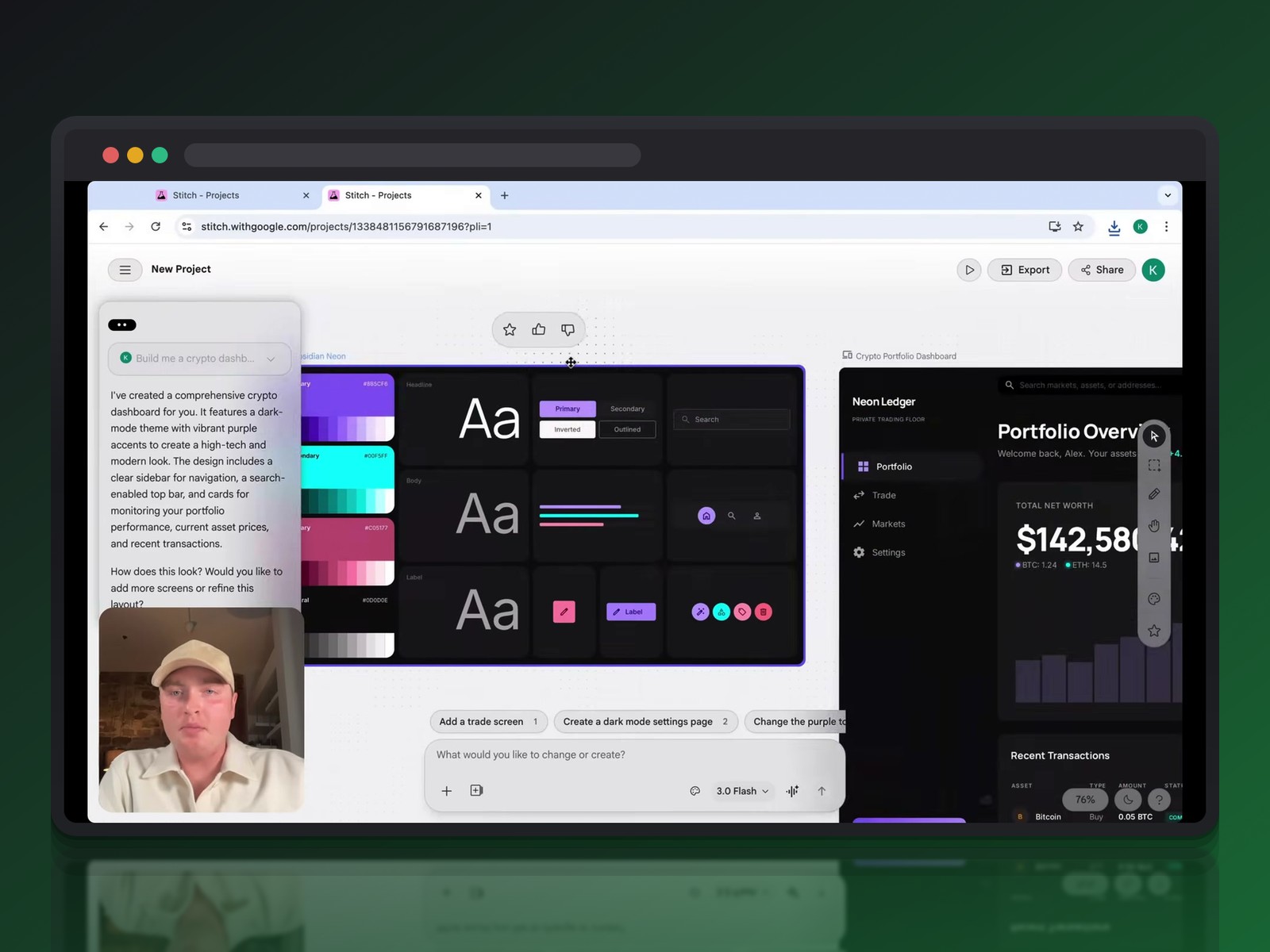
The first lesson from Stitch is philosophical. Instead of drawing one isolated screen, the tool first generates a complete design system: primary, secondary and neutral colors, a type scale, base components.
On a dark-mode crypto dashboard test with purple as the primary color, Stitch immediately delivers buttons, badges and progress bars that already feel consistent. Starting from a blank page produces noticeably weaker results by comparison.
Foundations before the first screen
On a second test — a product page for a tea shop — the tool breaks its own work down into elementary building blocks before delivering a full screen: buttons, labels, reference palettes. This modular approach is reassuring: the AI builds an editable system from the start, not a frozen image.
Granular, real-time style control
The settings panel on the right lets you adjust corner radius, fonts or contrast without touching a single layer by hand. Switch from rounded to sharp corners, and the whole interface updates instantly:
- font too rigid → swapped for a more elegant typeface in one click
- rectangular buttons → rounded edges applied globally
- weak contrast → primary colors automatically rebalanced
From exploration to export: the full workflow
Once the foundation is set, Stitch becomes a genuine conversational canvas. Ask for extra pages — trading, settings, markets — and the tool respects the navigation structure already in place.
Variants, dark mode and a predictive heatmap
The variation feature offers three levels: refine, explore, or reimagine a page entirely. On a trading page, the AI proposed two distinct directions within seconds — one with horizontal bars, another closer to Coinbase's layout.
Flipping a whole interface into dark mode takes only seconds, contrast recalculated included — testers note that the mobile designs it generates are often more polished than their desktop counterparts.
Annotation, a bridge to team collaboration
For collaborative feedback, an annotation tool lets you draw directly on the mockup or leave a text comment. Describe a change in plain language — say, making a typeface more elegant — and the agent updates the whole visual hierarchy to keep things consistent.
From clickable prototype to usable code
Screens can be linked together to simulate a real user flow, hotspots included. Stitch even distinguishes clickable zones from dead space, which makes client demos feel credible from the first pass.
On export, three doors open: copy-paste into Figma while preserving auto-layout, download a ZIP with the design Markdown files, or go straight through Google AI Studio to generate a React component hierarchy in Tailwind CSS.
Up against the pack: Figma Make, Claude Design and the rest of the field
An independent comparison tested a dozen tools, from Figma to newcomers like Paper or Magic Path. Stitch lands in tier A, held back mainly by sluggish canvas rendering during animations.
The design.md bet
Stitch's most structural contribution is its design.md format: a Markdown version of the design system, readable by both humans and AI agents. This plain-text file becomes a shared source of truth between design and code, without locking anyone into a proprietary format.
That's exactly what Claude Design hasn't done: Anthropic's tool produces polished results, but with its own closed format. The flow there stays one-way, toward Claude Code, never back.
The limits that remain
Figma, for its part, still holds a solid lead thanks to its dev mode, variables, and years of usage data on auto-layout. The announcements from Config 2026 — MCP connectors, generative plugins — show Figma has no intention of ceding ground to generative AI without a fight.
The comparison actually ranks Figma in tier B only: its WebGL foundation loses fidelity between prototype and final code, a problem that lighter tools like Paper or Magic Path avoid by working directly inside the coding environment, right next to agents like Cursor or Claude Code.
Can Stitch replace Figma Make in your workflow?
The short answer is no — not yet, anyway. Figma remains deeply embedded in team habits, with collaboration tools and design systems already built that Google can't replicate in a few months.
Stitch shines instead at the 0-to-1 stage: ten concepts explored in minutes, for free, before you even open a production tool. It's an ideation accelerator, not a replacement for the Figma Make, Framer and Lovable trio when it comes to finishing the job.
Then there's the jobs question. The comparison that keeps coming up is ChatGPT, which didn't wipe out communication careers: AI in design will reshape our roles more than it erases them. As Figma's AI agent and its MCP connectors already show, automation shifts the work — less time drawing every button, more time directing and validating concepts.
Conclusion: two tools, two moments in a project
Google Stitch isn't burying Figma, but it's changing how we approach a project. Explore fast and for free with Stitch, refine and ship with Figma — and design.md could well become the standard bridge between the two worlds.
The race is moving fast: Google ships weekly updates, and Figma has every card it needs to respond. One thing is certain — our added value is already shifting toward art direction and strategy, away from pixel-by-pixel execution.
Further reading
This synthesis article is based on the following videos:
- Google Stitch face à Figma : l'intelligence artificielle révolutionne la conception d'interfaces et le prototypage web
- Le futur du design UI/UX en 2026 : entre agents IA et fusion du code
- Découverte de Google Stitch : transformer vos prompts en interfaces interactives et prototypes fonctionnels
Articles generated via Vidiome, then merged and enriched.