Preview 1 of 4
Native Scope Kit for WooCommerce (block theme, Cart and Checkout blocks)
A 120-feature sourced scope matrix, labelled screens, theme.json and a guide, to price your store on WooCommerce® and WordPress before design. In French.
Overview
Description
This kit is for designers, freelancers and agencies who design a store on WooCommerce® and WordPress with a block theme, and who need to price it before they design it. It answers one question, block by block: is what you are drawing native, configurable in the admin or the site editor, paid, or custom development? Every block on the screens carries a label that points to a row of the matrix, and every row cites the official documentation page or the published file it rests on. You show your client designs the commerce plugin and the theme can deliver, and you price separately whatever needs an extension, a payment gateway or development.
The kit is written in French. The scoping guide is in French only, as are the matrix and the screen labels; documentation excerpts stay in their original language, and admin paths follow the French interface, with the English label from the documentation in brackets. No English version of the guide is included.
The kit draws the store with the Cart and Checkout blocks and the Twenty Twenty-Five default theme. A row caught at scoping is priced before the design rather than at handover: a product page template that keeps the old add-to-cart form and the old gallery, filters missing from the catalog template, an extension that is not compatible with the blocks and sends the cart and checkout back to the shortcode, My Account pages whose layout cannot be composed in the site editor, online payment that always goes through a gateway.
Official sources checked on 11 November 2026, for WooCommerce 11.2.2, WordPress 7.1.4 and the Twenty Twenty-Five 1.5 theme, on a fresh install. The kit helps you scope and design: it is not legal advice, an audit of your store or a guarantee of completeness.
Specifications
| Matrix | 120 rows |
|---|---|
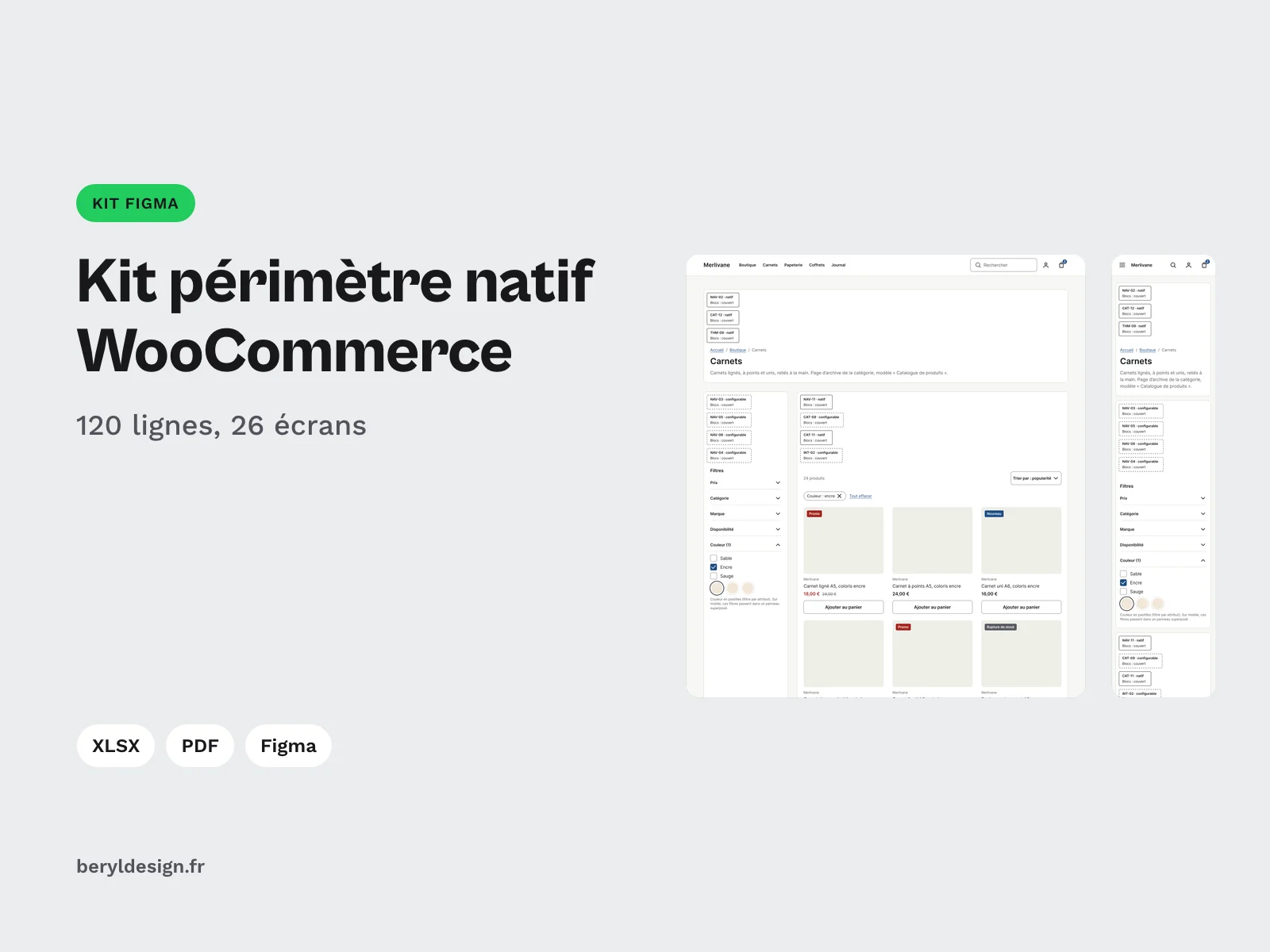
| Screens | 26, 23 of them in desktop and mobile, plus 3 emails |
| Tokens | 52 |
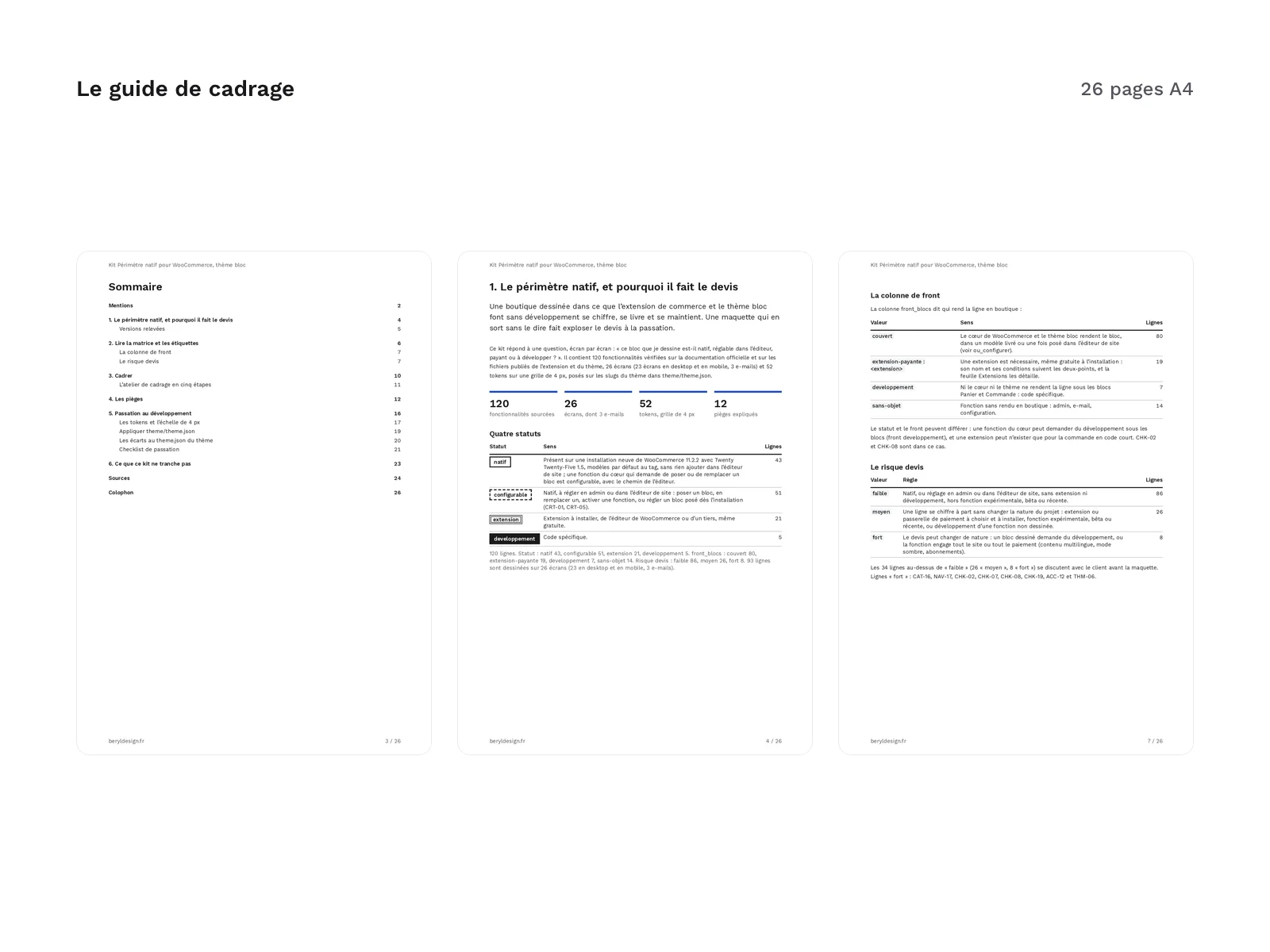
| Scoping guide | 26 pages |
| Handoff checklist | 19 items |
| Formats | XLSX, UTF-8 CSV, tagged A4 PDF, Markdown, DTCG JSON, DTCG 2025.10 JSON, theme.json (version 3) |
| License | commercial (page in French) |
| Version | 1.0.0 of November 11, 2026 |
Contents
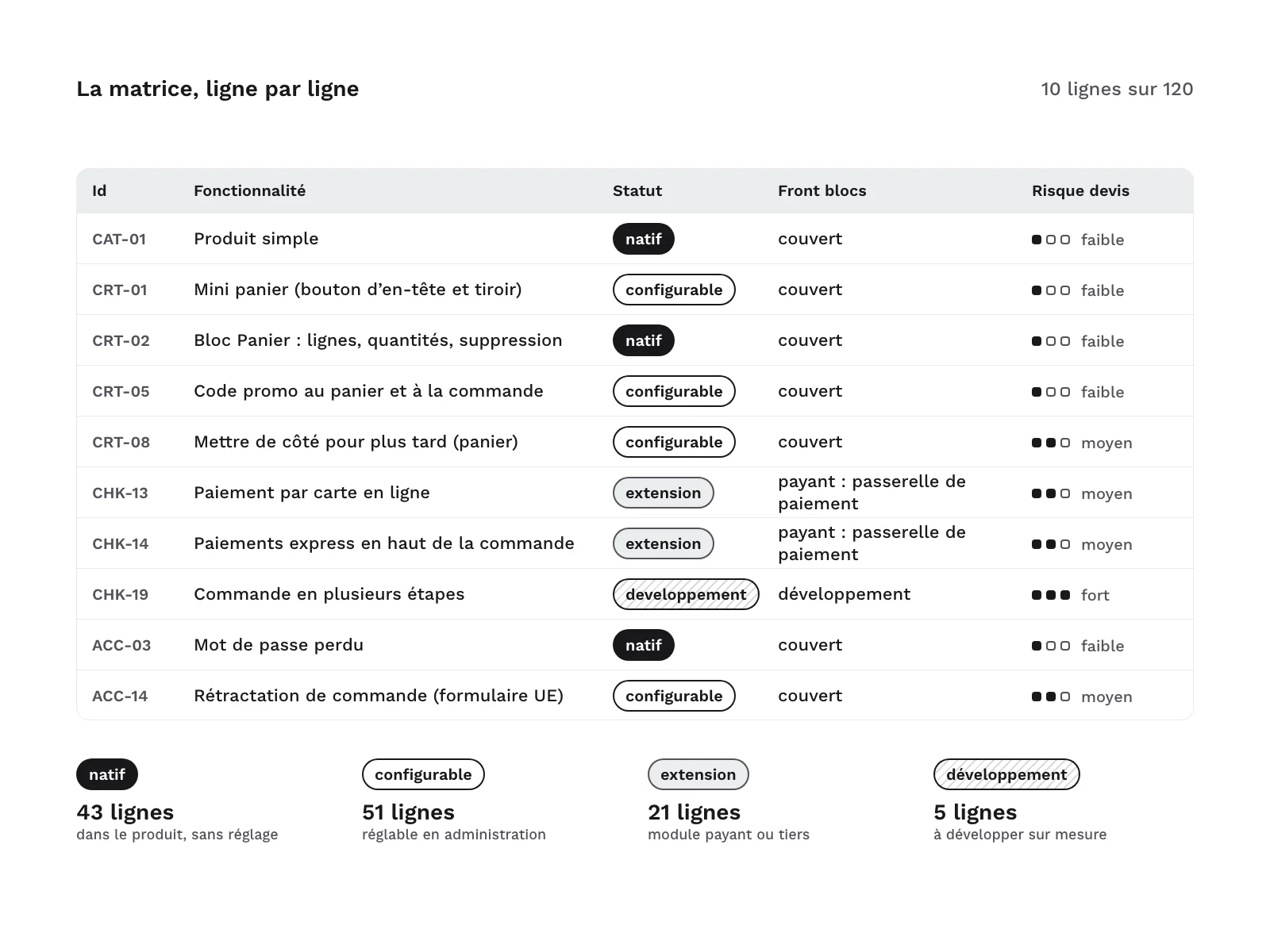
A 120-row matrix, one row per feature, grouped by area: catalog, navigation and search, product page, cart, checkout, account, content, emails, international and theme. Three columns drive the quote:
| Column | Split of the 120 rows |
|---|---|
| Status | 43 native, 51 configurable with the path in the admin or the site editor, 21 extension (from the WooCommerce vendor or a third party, even a free one), 5 development |
| Block front end | 80 rendered by the core and the block theme, 19 by an extension, 7 to develop under the Cart and Checkout blocks, 14 with no storefront rendering (admin, email, configuration) |
| Quote risk | 86 low, 26 medium, 8 high |
- High risk: the 8 rows where the quote can change in nature, such as subscriptions, multilingual content, an extension that is not compatible with the blocks or only built for the classic checkout, checkout fields added in code, a multi-step checkout, a different account layout and a dark mode chosen by the visitor.
- Sources: each row cites its official page, the date it was read and a short excerpt in the original language, 25 words at most, 87 source URLs in all, 9 of them published files of WooCommerce or the theme. The spreadsheet has 5 sheets: How to use, Matrix, Screens, Extensions (the 18 extensions cited, with their terms and no prices) and Sources.
- A design file for Figma: 23 screens in desktop and mobile, and 3 emails (processing order, new account, password reset).
- Screens: home, shop and category with filters, search results, simple product, variable product with swatches, grouped product, external product, mini-cart drawer, cart, one-page checkout, order confirmation, sign-in and registration, account dashboard, orders, order detail, downloads, addresses, account details, lost password, content page, blog post, not-found page, withdrawal request.
- Multi-step variant: the checkout has a multi-step variant, in desktop and mobile, whose label says it needs development. That makes 24 desktop frames and 24 mobile frames.
- Labels: 93 matrix rows are drawn, in 93 blocks per screen set and 280 labels in all. Each block carries a two-line label, the ID and the status, then the block front-end value, always spelled out; the outline repeats the status. The labels sit on an annotations layer you can hide.
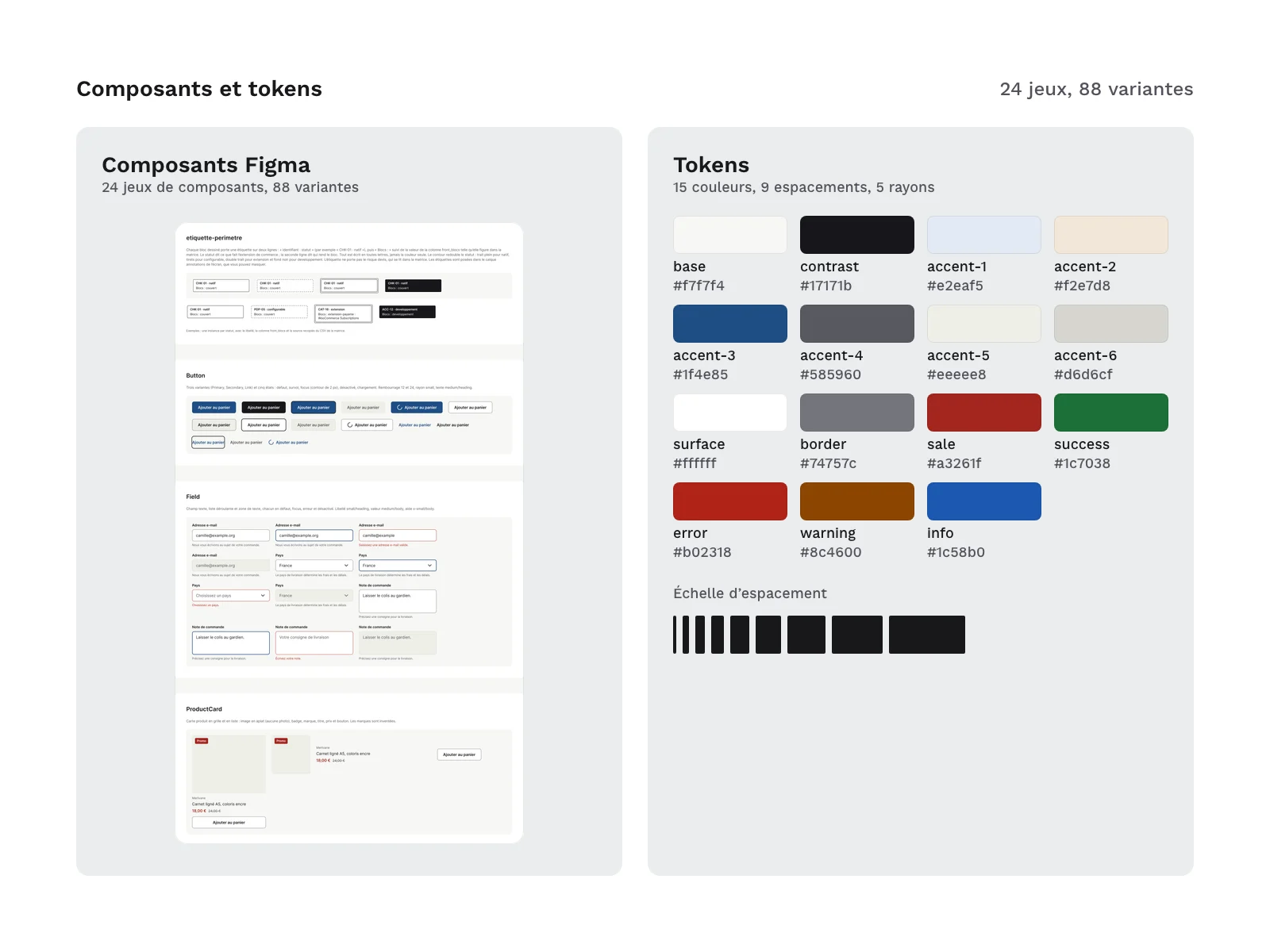
- Foundations and components: 50 variables, 13 text styles, 2 effect styles, 24 component sets with 88 variants (scope label, buttons, fields, checkboxes and radio buttons, swatches, quantity, badges, price, product card, facets, active filters, breadcrumb, pagination, tabs, accordion, messages, ratings, checkout steps, cart line, order summary, header and footer, drawers, modal) and 36 icons. No logos: payment methods are written as text labels.
- 52 tokens, including 15 colors, 9 spacings, 5 radii, 7 text steps with their size and line height, 2 font families, 2 font weights, 2 sizes, 1 border width and 2 shadows. They are identical in the design file, both token files and
theme/theme.json, and their names reuse the slugs of the theme’s presets, extended by the kit. Spacings, radii, sizes, line heights and shadow offsets are multiples of 4 px. - A
theme/theme.jsonfile that sets these tokens on the Twenty Twenty-Five slugs, to place in a child theme: palette, spacing scale, font sizes, font, radii, shadows and global styles (text, links, headings, button). It comes withtheme/ecarts-config-defaut.md: the 12 differences between this file and the theme’s theme.json, each with its reason, where to set it and the action to decide at handover, then the 19 theme values that fall off the 4 px grid. - A 26-page scoping guide, in French: native scope and the versions checked, reading the matrix and the labels, the 8 questions to ask the client before designing, a step-by-step scoping workshop, 12 pitfalls where a plausible design leaves native scope without saying so, handover to development, applying theme.json and its differences, the 15 features the kit does not settle (10 with no official page, 3 outside its scope, 2 with no storefront screen), and 28 sources.
- A 19-point handover checklist, in the guide and as a text file to paste into a ticket.
Files in the kit:
LICENCE.txt
LISEZMOI.txt
CREDITS.txt
figma/native-scope-kit-for-woocommerce-blocks-1.0.0.fig
guide/guide-cadrage.pdf
guide/checklist-passation.md
matrice/perimetre-natif.xlsx
matrice/perimetre-natif.csv
tokens/tokens.json
tokens/tokens.2025-10.json
theme/theme.json
theme/ecarts-config-defaut.md
Formats and compatibility
- Matrix in XLSX and UTF-8 CSV, with the same IDs: the spreadsheet has drop-down lists and a frozen header, and filters by screen, by status or by risk; the CSV imports into any spreadsheet or tracking tool. Admin paths follow the French interface, with the English label from the documentation in brackets.
- Guide as a tagged A4 PDF, in French, and the checklist in Markdown.
- Tokens in DTCG JSON in the pre-2025.10 format, with string values (
tokens/tokens.json), and the same tokens in DTCG 2025.10 format for other tools (tokens/tokens.2025-10.json). - Theme:
theme/theme.jsonfollows version 3 of the format and was validated against the official theme.json schema for WordPress 7.0 and 7.1. It goes in a child theme of Twenty Twenty-Five, with the style.css that declares the parent theme; the store must run WordPress 7.0 or later, the version WooCommerce 11.2.2 requires. It has not been installed in a live store. - Plugin and theme code: the kit contains no file or pattern from WooCommerce or the Twenty Twenty-Five theme. Its theme.json reuses the slugs of the theme’s presets, so the theme’s blocks and patterns find them, with the kit’s own values; 3 common values match the theme’s, and the guide declares them. The theme’s values are quoted, for comparison only, in
theme/ecarts-config-defaut.mdand in the matrix. - .fig file: a Figma-compatible file, to import into your workspace. Desktop screens at 1,440 px, mobile at 375 px, emails at 600 px.
- Fonts: Inter (SIL OFL 1.1) is referenced by the tokens and by theme.json, with no font file: install it in the child theme. The guide is set in Work Sans (SIL OFL 1.1), embedded in the PDF.
- Versions checked: WooCommerce 11.2.2, WordPress 7.1.4 and the Twenty Twenty-Five 1.5 theme, on a fresh install; official documentation read on 11 November 2026, each matrix row carrying its reading date.
Good to know
- The cart and checkout are drawn as blocks, the default experience for recent stores. An older store may keep its cart and checkout on the shortcode, and an extension that is not compatible with the blocks sends them back there, or needs development: the guide has you ask before designing.
- The checkout fits on one page: a multi-step checkout under the block is priced as development, and the multi-step variant in the design file carries that label.
- My Account pages keep their default layout: they follow the theme’s colors and typography, but cannot be composed in the site editor. The kit draws them as they are; any other layout is priced as development.
- Online payment goes through a gateway: the core only offers offline payments (bank transfer, check, cash on delivery). The kit quotes no extension or gateway prices: check them on the date of your quote.
- Some drawn blocks depend on a beta block or an experimental feature of WooCommerce 11.2.2 (new add-to-cart form, color swatches, wish list, save for later in the cart), which may change from one version to the next; their label says configurable and their risk is medium. WooCommerce 11.3 was not out on 11 November 2026: when it ships, check these rows again; if a status changes, it goes into the kit’s updates.
- Store, people and product names on the screens are fictitious.
- The PDF is tagged, but its PDF/UA conformance has not been measured.
- The kit is not a theme and contains no extension: it is for scoping, designing and handing over to development.
- The matrix names a few extensions, gateways and payment methods, for reference only.
- The guide, the matrix and the labels are in French; there is no English guide.
- Updates: free for buyers, released as the platform evolves, with no guaranteed schedule. They cover fixes to the kit and, when a new version of WooCommerce, WordPress or the theme changes a status, a source or a setting, updates to the matrix, labels, tokens, theme.json and guide. They do not cover the features left out of the matrix, which the guide lists separately.
License
The kit is sold under the commercial license (terms in French), as a one-off payment: you may use it in your personal and professional projects, including for clients, but you may not resell or redistribute its files, even modified, as a kit or as a template. You may ship theme/theme.json inside a client project’s child theme: that is use in an end product, which the license allows; only redistributing it as a reusable asset is excluded.
Further reading
Version history
1.0.0 (11 November 2026): first version.
Notices
WooCommerce® and its associated designs are trademarks of Automattic Inc. WordPress is a trademark of the WordPress Foundation. Twenty Twenty-Five is the name of the WordPress default theme, cited for reference. Other extension and provider names belong to their respective owners and are cited only to describe compatibility. Independent kit, not affiliated with, endorsed or sponsored by Automattic Inc. or the WordPress Foundation.
The names of WooCommerce, WordPress and the theme are used only to state compatibility and scope; the demo content of the design file uses invented brands. No logos, no screenshots of a real store or of the theme, no imitated interface: the screens are redrawn from the documented page structure.
AI disclosure: the matrix, guide text, tokens, theme.json, check scripts and the build of the design file were produced with an AI assistant (Claude Code, Anthropic), then checked by scripts and review. Official sources checked on 11 November 2026: every matrix row cites the source it rests on. The kit contains no AI-generated images.