Preview 1 of 4
Native Scope B2B Kit for Adobe Commerce (company accounts, quotes, requisition lists)
A 71-feature sourced B2B scope matrix, labelled screens and a guide, to price your Adobe Commerce B2B store on Luma or Hyvä Enterprise before design. In French.
Overview
Description
This kit is for designers, freelancers and agencies who design a B2B journey on Adobe Commerce, with Adobe’s B2B extension, for the Luma storefront that ships with the platform or for Hyvä® Enterprise, and who need to price it before they design it. Company accounts, credit, shared catalogs, quick order, requisition lists, quotes and purchase orders: it answers one question, block by block. Is what you are drawing native, configurable in the admin, paid, or custom development? Every block on the screens carries a label that points to a row of the matrix, with its value for each of the two front ends, and every row cites the official documentation page it rests on. You show your client designs the platform can deliver, and you price separately whatever needs an extra license or development.
The kit is written in French. The scoping guide is in French only, as are the matrix and the screen labels; documentation excerpts stay in their original language. No English version of the guide is included.
A row caught at scoping is priced before the design rather than at handover: B2B features that are all disabled by default and are each switched on separately, a quick order and an order by SKU that exclude each other, two settings that share the purchase order name and have nothing else in common, a Hyvä front end that goes entirely through a paid license.
Official sources checked on 11 November 2026, for Adobe Commerce 2.4.9 with the 1.5 branch of the B2B extension, the Luma storefront and, on the Hyvä side, Hyvä Enterprise on the Hyvä 1.5.3 theme. The kit helps you scope and design: it is not legal advice, not an audit of your store, and makes no claim to be exhaustive.
Specifications
| Matrix | 71 rows |
|---|---|
| Screens | 29, 25 of them in desktop and mobile, plus 4 emails |
| Tokens | 58 |
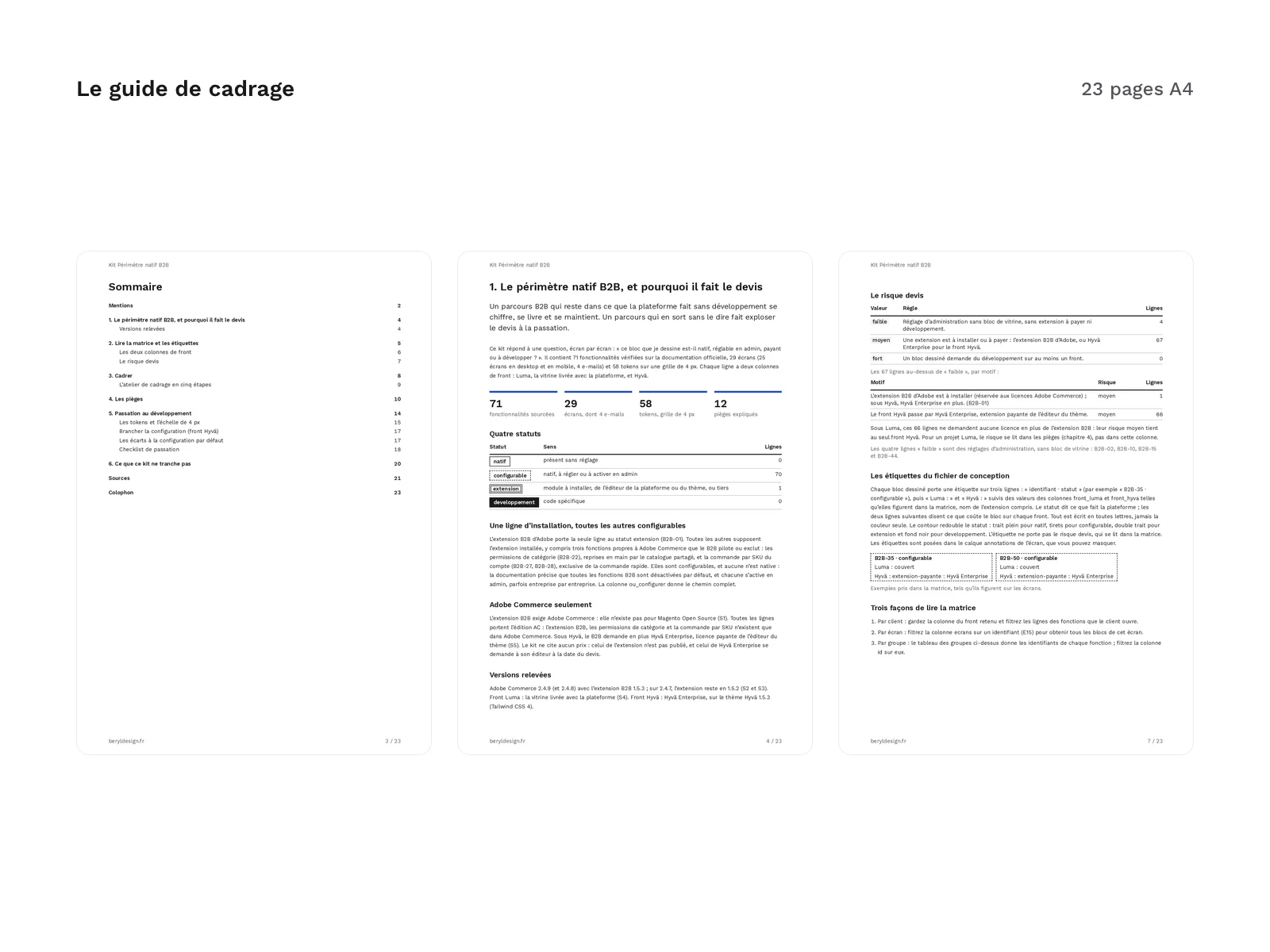
| Scoping guide | 23 pages |
| Handoff checklist | 22 items |
| Formats | XLSX, UTF-8 CSV, tagged A4 PDF, Markdown, DTCG JSON, DTCG 2025.10 JSON, Tailwind CSS 4 (@theme), Tailwind CSS 3 (JS config) |
| License | commercial (page in French) |
| Version | 1.0.0 of November 11, 2026 |
Contents
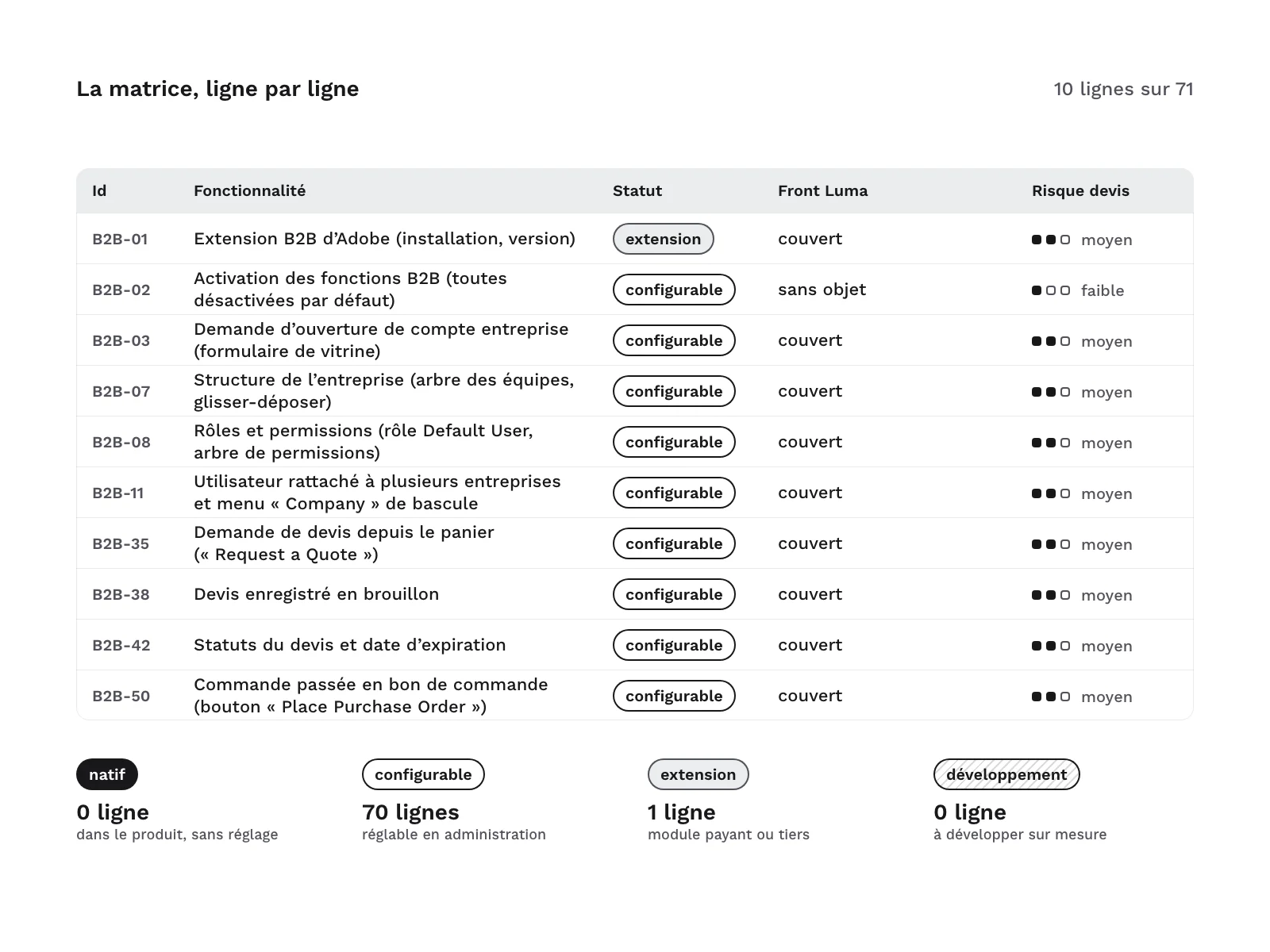
- A 71-row matrix, one row per feature, in 10 feature groups: foundation, company accounts, credit and payment, shared catalogs, quick order, requisition lists, quotes, purchase orders, B2B emails and cart.
- Status: 70 configurable rows, with the exact admin path and the per-company setting where one exists, 1 extension row (installing the B2B extension), none native and none requiring development.
- Edition: every row is specific to Adobe Commerce.
- Two front-end columns: on Luma, 67 rows are covered by the storefront that ships with the platform and 4 are not applicable (admin settings with no storefront block); on Hyvä, 67 rows go through Hyvä Enterprise and 4 are not applicable.
- Quote risk: 4 rows low, 67 medium, none high. Medium risk comes from the B2B extension to install or from the Hyvä Enterprise front end: for a Luma project, the real risk is in the guide’s pitfalls.
- Sources: every row cites its official page, the date it was read and a short excerpt in its original language, 59 source URLs in all. The spreadsheet adds How to use, Screens, Extensions (the 2 licenses to plan for, without prices) and Sources sheets.
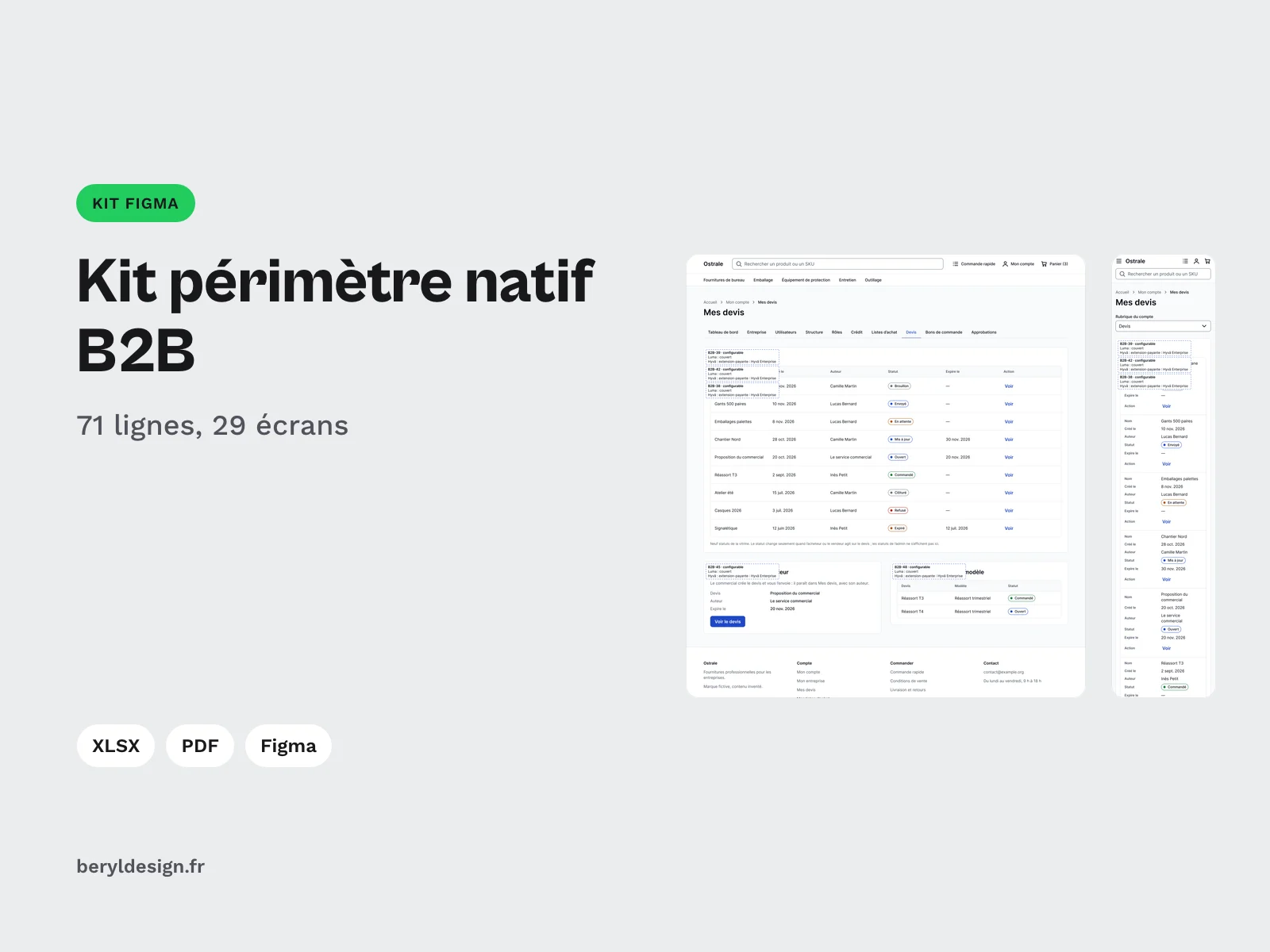
- A design file for Figma: 25 desktop screens, their 25 mobile versions and 4 emails (company account activated, company credit updated, quote updated, purchase order awaiting approval).
- Screens: company account request, sign-in and account states, B2B account dashboard, company profile, users, team structure, roles and permissions, company credit, category and product page on a shared catalog, quick order and order by SKU (two mutually exclusive options), requisition lists and list detail, B2B cart, quote request, quote list and detail, quote templates, B2B checkout (shipping, then payment), purchase orders and their approval, approval rules and access denied.
- Labels: 65 matrix rows are drawn, in 63 blocks per screen set and 164 labels in all. Every block carries a three-line label, the row ID and status, then the Luma value and the Hyvä value, always spelled out and placed on an annotations layer you can hide.
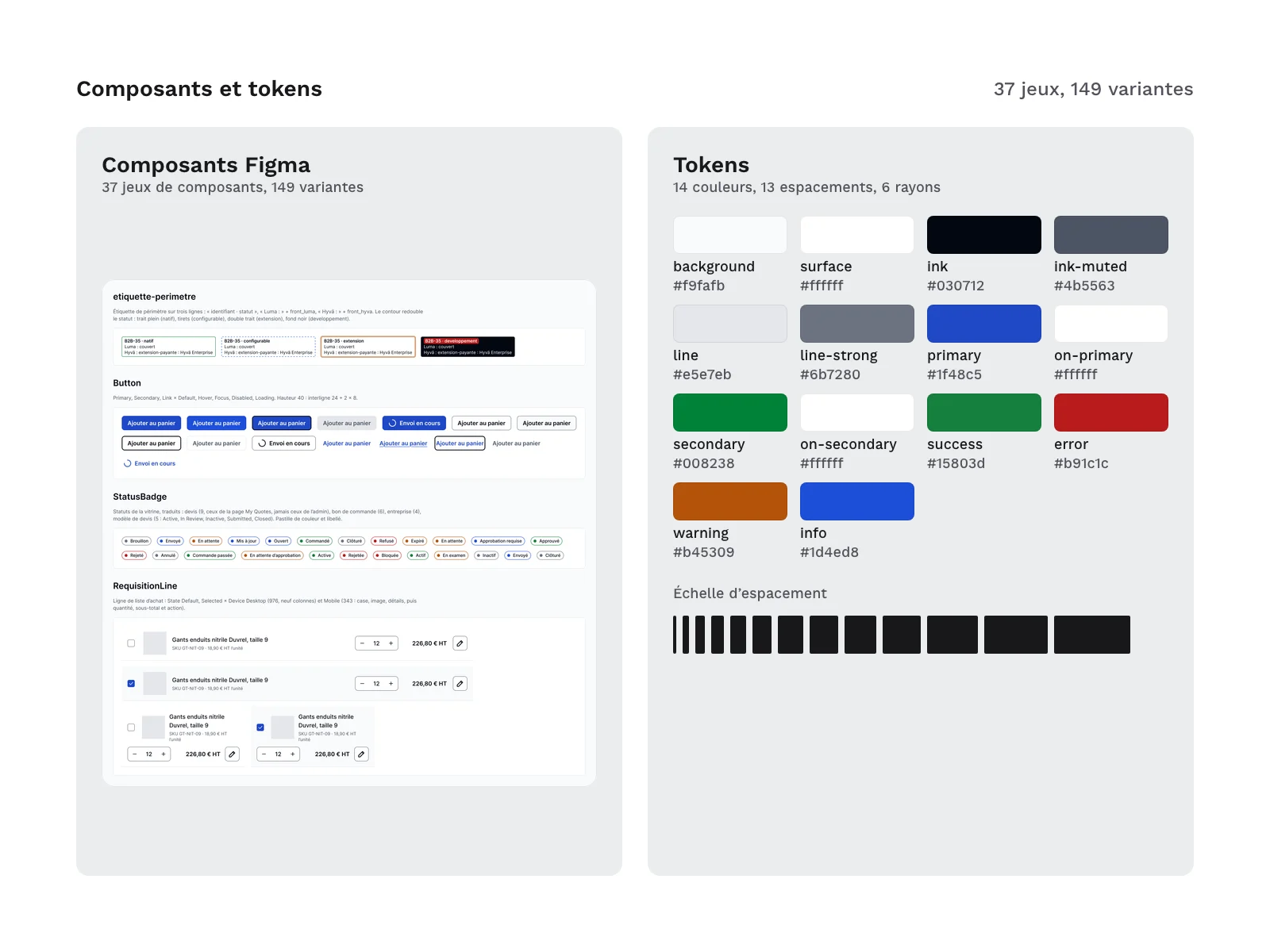
- Foundations and components: 55 variables, 16 text styles, 3 effect styles, 37 component sets with 149 variants and 40 icons. Store components (buttons, fields, prices, product card, cart, checkout, header and footer in desktop and mobile) come with B2B ones: company switcher, status badges, requisition list line, team tree, permissions, approval rule, credit summary, SKU entry, file upload, history and comments. No logos.
- 58 tokens, including 14 colours, 13 spacing steps, 6 radii, 9 text sizes with their line height, 3 font weights and 3 shadows, identical in the design file, the token files and the theme config. No step off the spacing grid.
- The theme config for the Hyvä front end: the block to merge into the theme config, the CSS file it should produce so you can check your build, a config for a theme still on Tailwind CSS 3, and an annotated list of the 11 differences from the theme’s default config, to apply or reject at handover. For the Luma storefront, the tokens give the values to carry over into the theme’s styles.
- A 23-page scoping guide, in French: reading the matrix and the two front-end columns, the 7 questions to ask the client before designing, a step-by-step scoping workshop, 12 pitfalls where a plausible B2B journey runs into a limit of the platform or of a front end, handover to development, the 5 features the kit does not settle (3 with no official page, 2 outside its scope), and the sources.
- A 22-point handover checklist, in the guide and as a text file to paste into a ticket.
Kit files:
LICENCE.txt
LISEZMOI.txt
CREDITS.txt
figma/native-scope-b2b-kit-for-adobe-commerce-1.0.0.fig
guide/guide-cadrage.pdf
guide/checklist-passation.md
matrice/perimetre-natif.xlsx
matrice/perimetre-natif.csv
tokens/tokens.json
tokens/tokens.2025-10.json
theme/config-tokens.json
theme/theme.css
theme/tailwind.config.js
theme/ecarts-config-defaut.md
Formats and compatibility
- Matrix in XLSX and UTF-8 CSV, with the same IDs: the spreadsheet has drop-down lists and filters by chosen front end, by screen or by feature group; the CSV imports into any spreadsheet or tracking tool.
- Guide as a tagged A4 PDF, with bookmarks, in French, and the checklist in Markdown.
- Tokens in DTCG JSON in the format read by the theme’s
hyva-tokenstool (tokens/tokens.json), and the same tokens in DTCG 2025.10 format for other tools (tokens/tokens.2025-10.json). - Theme (Hyvä front end):
theme/theme.cssis the expected Tailwind CSS 4 output (@theme);theme/tailwind.config.jscarries the same scale for Tailwind CSS 3. The config was checked with thehyva-tokenstool in a test project outside a store: not in a full store, and not with the templates of the Hyvä Enterprise B2B modules. - Theme (Luma front end): no variables file; the tokens give the values to carry over.
- .fig file: a Figma-compatible file, to import into your workspace. Desktop screens at 1,440 px, mobile at 375 px, emails at 600 px.
- Fonts: Inter (SIL OFL 1.1) is referenced by the tokens and not supplied: your project loads it. The guide is set in Work Sans (SIL OFL 1.1), embedded in the PDF.
- Versions checked: Adobe Commerce 2.4.9 with the 1.5 branch of the B2B extension (the guide gives the extension version for each platform version), Hyvä 1.5.3 theme for the Hyvä Enterprise front end.
Good to know
- The B2B extension requires Adobe Commerce: it does not exist for Magento® Open Source. Without an Adobe Commerce license, no row of the matrix applies.
- On Hyvä, the B2B front end requires Hyvä Enterprise, a paid license from the theme vendor, installed after Adobe’s B2B extension. The date of that license changes what it includes: the guide says what to ask the client. The kit quotes no license prices: check each vendor’s terms on the date of your quote.
- For the Hyvä front end, the vendor’s public compatibility tracker names gaps on a few rows, and two rows are missing from it: the guide lists them and says which to confirm with the vendor.
- Store, company and product names on the screens are fictitious.
- The guide is a tagged PDF, but its PDF/UA conformance has not been measured.
- The kit contains no extension or module: it is for scoping, designing and handing over to development.
- Outside the kit’s scope: Adobe Commerce as a Cloud Service, which does not support Luma storefronts, Edge Delivery Services front ends and the B2B GraphQL API.
- On screen E17 (My quotes), the labels of the first block overlap the title and the table header: hide the annotations layer to see the whole block.
- The guide, the matrix and the labels are in French; there is no English guide.
- Updates: free for buyers, released as the platform evolves, with no guaranteed schedule. They cover fixes to the kit and, when a new release of the platform, the B2B extension or the theme changes a status, a source or the config, updates to the matrix, labels, tokens and guide. They do not cover the features left out of the matrix, which the guide lists separately.
License
The kit is sold under the commercial license (terms in French), as a one-off payment: you may use it in your personal and professional projects, including for clients, but you may not resell or redistribute its files, even modified, as a kit or as a template.
Further reading
Version history
1.0.0 (11 November 2026): first version.
Notices
Independent kit, not affiliated with, endorsed or sponsored by Adobe Inc. or Hyvä Themes B.V. Adobe and Adobe Commerce are either registered trademarks or trademarks of Adobe in the United States and/or other countries. Magento® is a registered trademark of Adobe. Hyvä® is a registered trademark of Hyvä Themes B.V. Luma is the name of the storefront theme that ships with the platform, Hyvä Enterprise the name of a Hyvä Themes B.V. product: both are cited for reference. Platform and front-end names are used here only to state compatibility; the screens are redrawn from the documented page structure, with no logos and no screenshots of a real store.
AI disclosure: the matrix, guide text, tokens, theme config, check scripts and the build of the design file were produced with an AI assistant (Claude Code, Anthropic), then checked by scripts and review. Official sources checked on 11 November 2026: every matrix row cites the source it rests on. The kit contains no AI-generated images.