Preview 1 of 4
Editorial and SEO agency for Claude Code: 10 roles, from Search Console analysis to publishing plan
A skill and 10 Claude Code agents that read your Search Console and GA4 exports, then prepare reviews, audits and a publishing plan without publishing anything.
Overview
Description
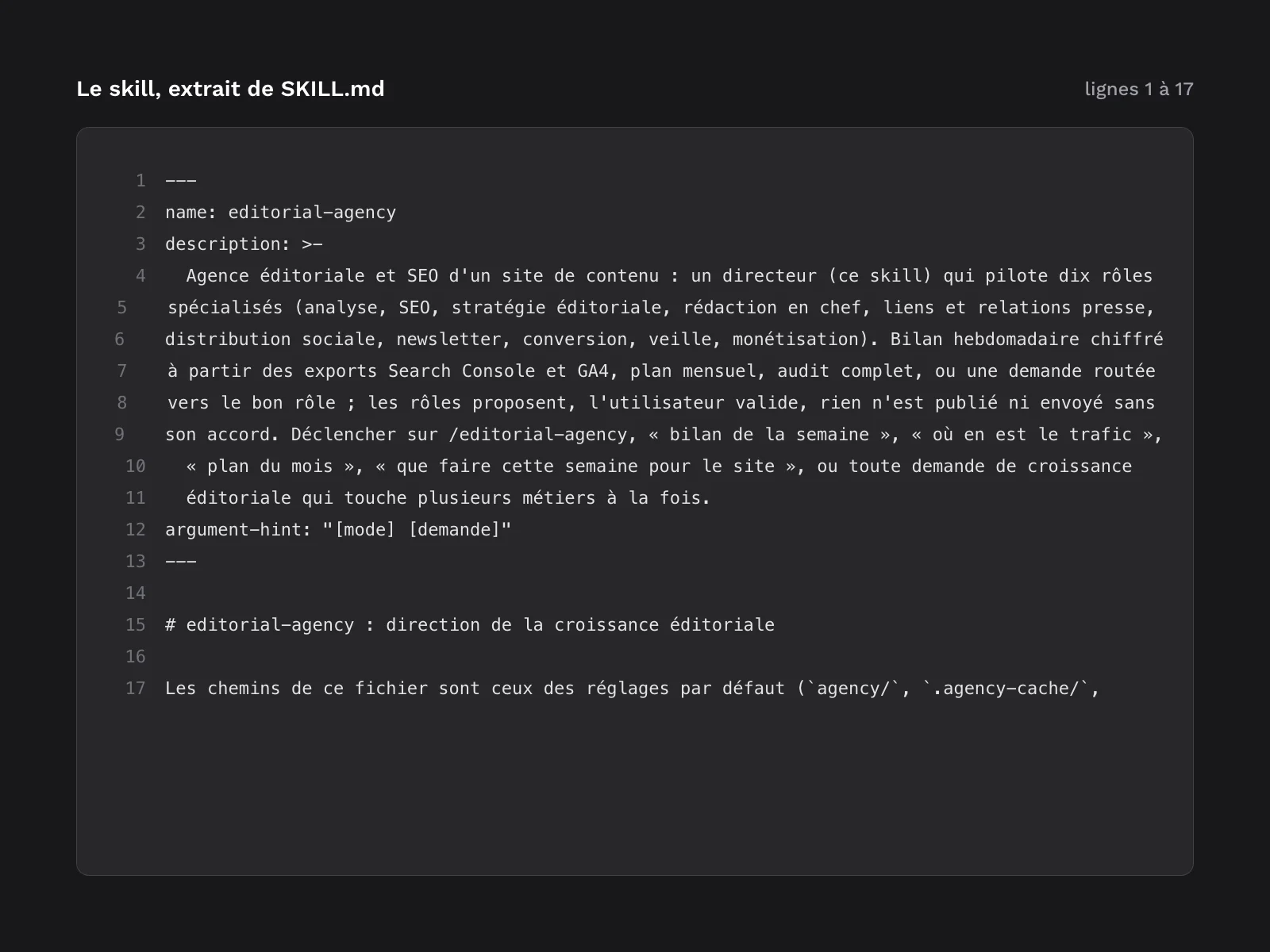
This kit is for bloggers, content site publishers and small editorial teams who work in Claude Code and want to grow their site with a steady method rather than one idea at a time. It adds a skill, /editorial-agency, which acts as the director, and 10 agents that work under its direction: data analysis, SEO, editorial strategy, editing, links and press relations, social distribution, newsletter, conversion, watch and monetization. The director reads the Search Console and GA4 exports you drop into your repository, calls the roles it needs, shows you their proposals with their evidence and stops before any action: nothing is published, sent or pushed without your approval. The agency’s state (site profile, objectives, journal, lessons, experiments, indicators) lives in your repository, next to your content. It is the generic version of a method the author uses on a real blog: private paths, accounts, API access and names have been removed, the steps have been kept.
Specifications
| Director skill | 1, 6 modes |
|---|---|
| Agents | 10 |
| Templates | 8 |
| Metrics script | 1 |
| Languages | 2 |
| Example | 48 files |
| Formats | Markdown (skill and agents), JSON (settings and state), JavaScript (metrics script, Node 18 or later), CSV (example exports), PNG (screenshots) |
| License | commercial (page in French) |
| Version | 1.0.0 of November 12, 2026 |
Contents
- 1 director skill,
editorial-agency(command/editorial-agency), with 6 modes plus single-role requests:init: sets up theagency/folder, a site profile read from the repository and completed with your answers, and first objectives;review: every week, indicators, signals, due experiments and proposed actions; the director stops so you can choose which ones to start;review-auto: the same review with nobody at the screen, for a scheduled task; it writes a dated report and applies nothing;plan: every month, the month’s review, revised objectives and a publishing calendar;audit: a full analysis of the site, search and audience, with a summary;followup: reads the experiments that have reached their end date, with a verdict and a lesson;- a request to a single role, for example
/editorial-agency seo page /guides/my-guide.
- 10 agents, one per role, each with its model and tools declared in its header:
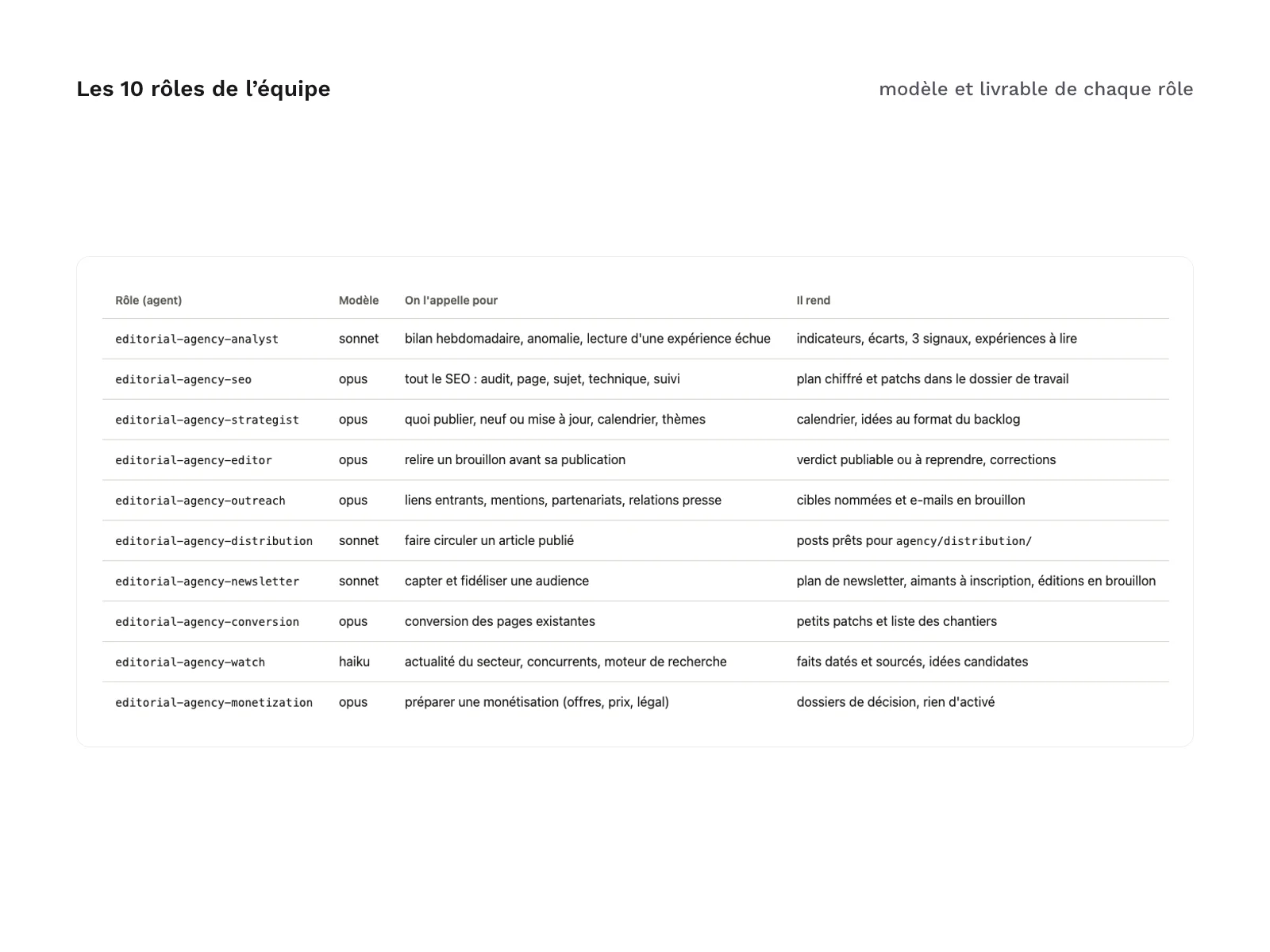
editorial-agency-analyst: weekly review, anomalies and experiment readings, delivered as indicators, gaps and signals;editorial-agency-seo: audit, page, topic and technical SEO, with a costed plan and fixes ready for review;editorial-agency-strategist: what to publish, new article or update, calendar and themes;editorial-agency-editor: reviews a draft before publication, with a “ready” or “needs work” verdict and the corrections;editorial-agency-outreach: backlinks, mentions, partnerships and press relations, with named targets and draft e-mails;editorial-agency-distribution: posts ready to share for a published article;editorial-agency-newsletter: newsletter plan, sign-up magnets and draft issues;editorial-agency-conversion: small conversion fixes on existing pages and a list of larger jobs;editorial-agency-watch: dated, sourced facts about the industry, competitors and the search engine;editorial-agency-monetization: decision files on offers, pricing and legal matters, with nothing switched on.
- 8 templates installed with the skill: site profile, objectives (Markdown and JSON), journal, lessons, acceptance criteria for outputs, state folder README and default settings (
editorial-agency.json). - 1 indicators script,
kpis.mjs: it reads your CSV exports, prints the week’s table without writing anything, and only appends a record to the history with the--applyoption. - 2 languages with the same structure,
fr/anden/: you install a single language per project. - One installation guide per language (
INSTALL.en.md,INSTALL.fr.md): requirements, installing in a project or for all your projects, settings, dropping the exports, a first project step by step, automatic review, updating and uninstalling.CHANGELOG.mdtracks versions. - A worked example in 48 files (
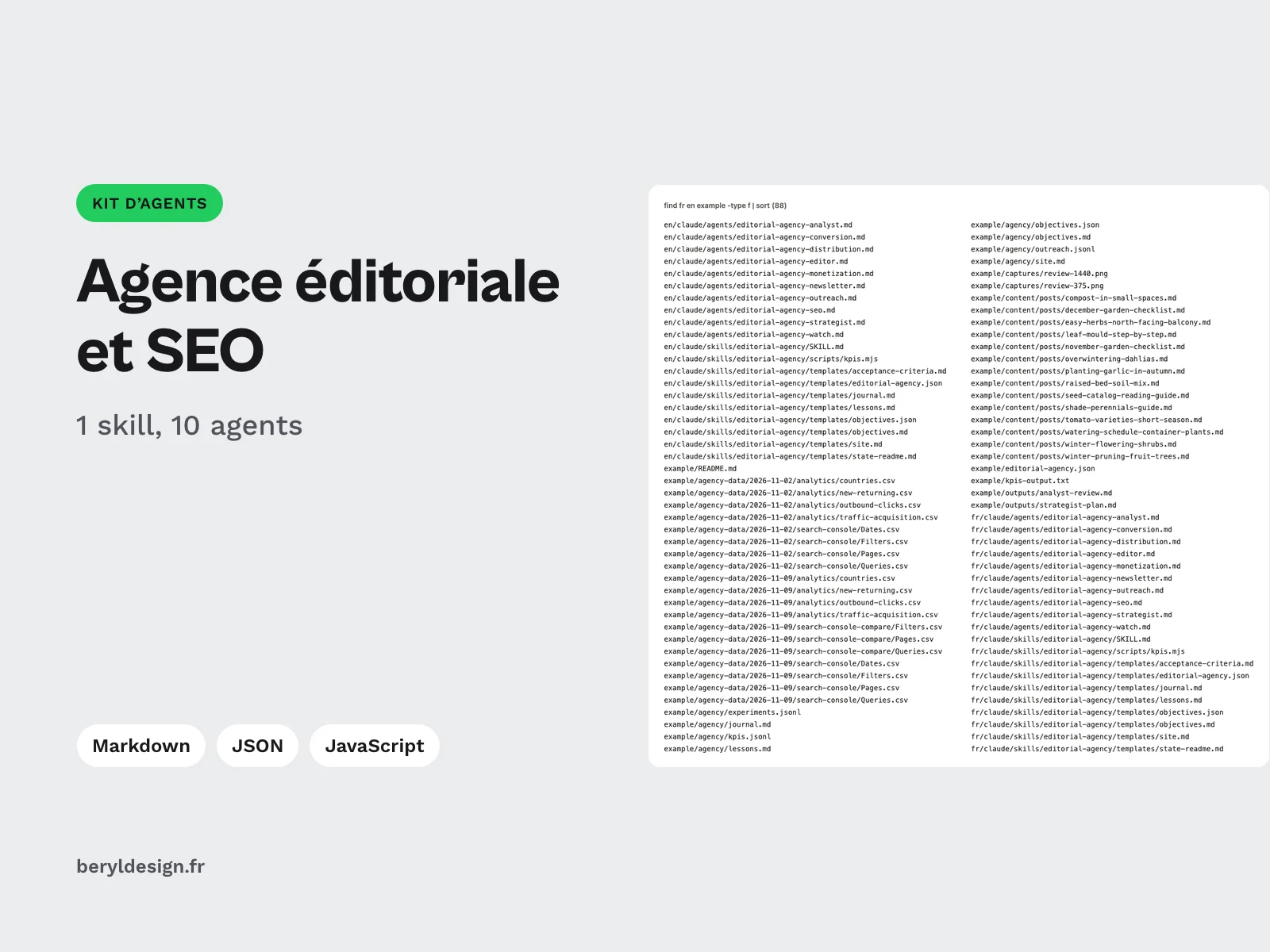
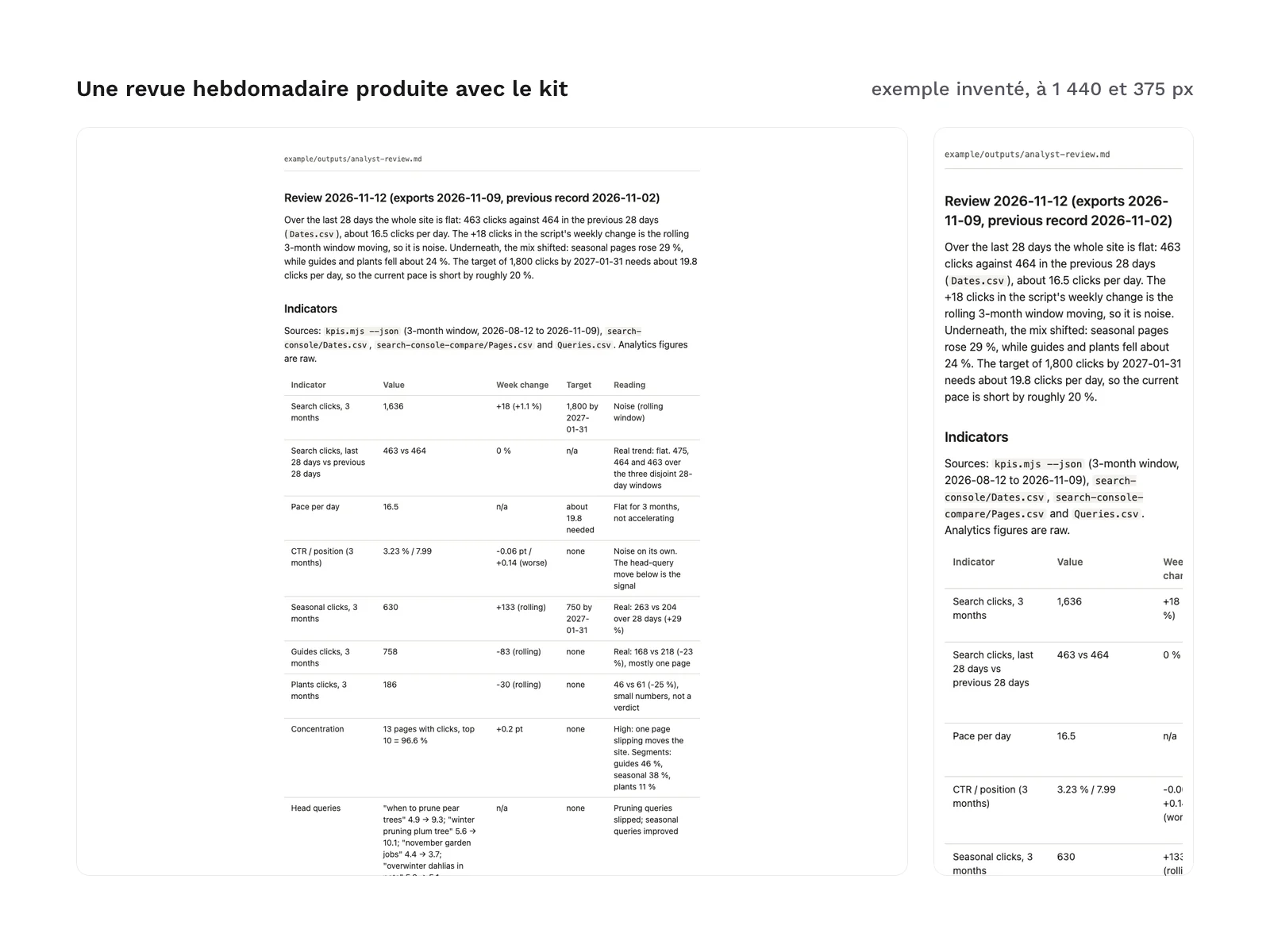
example/), in English, on a fictional gardening blog: settings, agency state, articles, two weekly export drops (2026-11-02 and 2026-11-09), the indicators script’s output, the analysis agent’s weekly review, the strategy agent’s publishing plan, and screenshots of the review at 1,440 and 375 px wide. - 91 files in total.
File layout:
fr/claude/skills/editorial-agency/:SKILL.md,templates/,scripts/kpis.mjsfr/claude/agents/:editorial-agency-*.mden/claude/: same tree, in Englishexample/:README.md,agency/,agency-data/,content/,outputs/,captures/- at the root:
INSTALL.fr.md,INSTALL.en.md,CHANGELOG.md
Each language’s claude/ folder mirrors Claude Code’s .claude/ folder: you copy it into a project or into your home folder. Its name has no leading dot so that it stays visible after unzipping. The agency’s state is written to the agency/ folder of your repository, your exports to .agency-data/, and the roles’ working files to .agency-cache/.
Production and AI
The generic version, the indicators script and the English translation were written with an AI assistant, Claude Code, from the method the author uses, then reviewed and checked before release: installation tested on a blank repository in both languages, in a project and for all projects; the 10 agents and the skill loaded by Claude Code; no absolute path, no secret and no private element found; same files, same headings and same settings in French and English; a review by a second agent, whose remarks were fixed.
The example was produced by two of the kit’s agent files, the analysis agent then the strategy agent, each run as a separate agent with only the tools in its header. Their outputs are copied as they were written; a single line was changed by hand, to replace the absolute path of a temporary folder with a relative one. The blog, its author, its articles and every figure in the example are invented: they show the shape of the outputs, not a result.
Formats and compatibility
- Markdown: the skill, the agents, the templates and the guides. Each agent file has a header (
name,description,tools,model) read by Claude Code. - JSON: the settings and the agency’s state. Settings are optional; without a file, the defaults apply. They set the state, exports and cache folders, the output language, your URL segments, the outbound domains to count, the conversion events to follow and the tools in your repository that apply an approved action.
- JavaScript: the indicators script, for Node 18 or later, with no dependency to install. It recognises the columns of the Search Console and GA4 interfaces in English and French.
- CSV: the example’s exports, in the format of the real interfaces.
- PNG: the example’s screenshots.
Requirements:
- Claude Code, in a version that supports skills and subagents;
- access to the models the agents set (Opus, Sonnet or Haiku); without access to Opus, the guide describes the
inheritfallback; - git, which the agency’s journal and decisions rely on;
- Node 18 or later, for the indicators script;
- access to your site’s Search Console and GA4, to export the reports by hand and drop them every week into a dated folder: the kit connects to no service;
- network access for the roles that read the web (SEO, strategy, editing, links, newsletter, watch, monetization).
Installation commands are typed in a terminal: macOS, Linux, or Windows with WSL or Git Bash.
What was tested, and what was not
Tested before release: installation in a project and for all projects, in both languages, on a blank repository; the 10 agents and the skill loaded by Claude Code; the indicators script on the example’s exports; a real example produced by two of the kit’s agent files.
Not tested, and dependent on your setup: triggering the skill with a free-form sentence (instead of /editorial-agency), the director actually delegating to each agent, model availability on your plan, tool permission prompts (Claude Code may ask you to allow node, curl or git), exports from an interface in a language other than English or French, and a full agency run over several weeks. The example shows what two agents produce from exports; it does not show the director’s orchestration, and its invented figures say nothing about the results the kit will bring on your site.
What the kit does not do:
- it connects neither to Search Console, nor to GA4, nor to any service: it reads your exports;
- it is not a hosted service: everything runs in your Claude Code session, on your machine, with your plan;
- it publishes, sends, posts and pushes nothing: the roles prepare, you decide;
- it does not write your articles: strategy suggests topics, editing reviews your drafts;
- it switches on no payment: monetization prepares decision files;
- it does not promise traffic: each recommendation carries an estimated gain, a confidence level and its evidence, and its effects show after several weeks.
License
The kit is sold under a commercial license: you can use it for your own sites and for your clients’ sites, and keep everything the agents produce for you. You may not resell or redistribute the kit or its files. If your repository is public, install the kit for all your projects, or add its folders to .gitignore as the installation guide explains; also mind the agency/ folder, which holds your figures and decisions.
Further reading
- On connecting an AI agent to your work tools: the guide to agents and the MCP protocol.
- On writing rules an agent actually follows (in French): writing the rules AI agents follow.
- For your site redesign, the companion kit: Agentic design studio for Claude Code.
Version history
1.0.0 (November 12, 2026): first release.
Claude Code is a trademark of its publisher; this kit is neither affiliated with nor endorsed by it.