WebGPU in 2026: Available Everywhere, Default Almost Nowhere
WebGPU is the graphics API that succeeds WebGL in the browser. It gives a web page modern access to the GPU, for rendering and for general computation. As of October 2026, it runs in all four major browsers, yet most web game engines still default to WebGL 2.
For a browser game, the question is no longer "does the player have WebGPU?". It is "what does a player without it see?". This article covers real support, what WebGPU changes for a game's visuals, and how to design with a fallback.
Every version number below comes from an official source: the WebGPU working group's implementation status page, Google's announcement on web.dev, and each engine's documentation. The blogs we came across contradict each other on dates, so we do not cite them.
Which Browsers Support WebGPU in 2026?
Support, Browser by Browser
WebGPU is on by default in Chrome, Edge, Safari and Firefox, with gaps depending on the operating system. The WebGPU working group's implementation status page, last updated on October 2, 2026, gives the details.
| Browser | On by default | Still missing or behind a flag |
|---|---|---|
| Chrome and Edge | Windows, macOS, ChromeOS since version 113; Android 12+ since 121 (depending on the chip) | part of Linux, Windows on ARM |
| Safari | macOS, iOS, iPadOS and visionOS since version 26 | marked as partial support on macOS by Can I use |
| Firefox | Windows since 141; macOS since 145 (Apple Silicon), then 147 (all Macs) | Linux (Nightly only), Android |
Google's announcement, "WebGPU is now supported in major browsers", dates from November 25, 2025. It marks the point where all four browser engines shipped the API in a stable release.
What That Means in Players
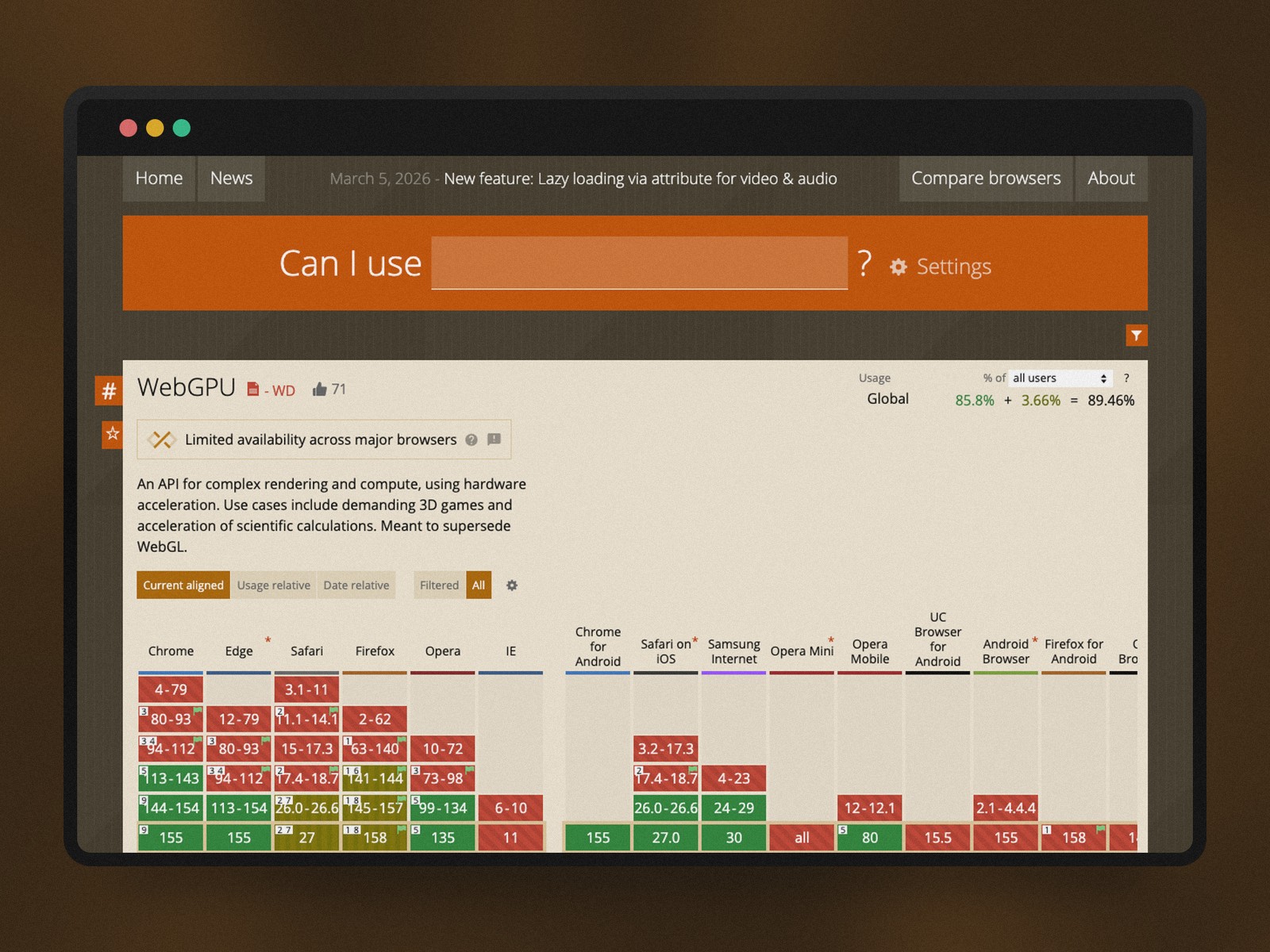
According to Can I use, checked on October 19, 2026, about 89% of users have a browser that supports WebGPU. For 3.7% of them, support is only partial. The site still labels the API as having "limited availability across major browsers".
That leaves roughly one visitor in ten without WebGPU, as a global average. They are on Firefox for Linux or Android, on some Android phones, or on systems that are too old.
For a browser game, that tenth matters. Players often switch devices, and our browser game UX guide treats continuity between desktop and mobile as a selection criterion. A visual layer that disappears on one of the two devices breaks that continuity.
Web Game Engines: WebGL 2 Is Still the Baseline
What the Official Documentation Says
Browser support is not enough: the game engine must speak WebGPU too. In October 2026, the engines' own documentation paints a more cautious picture than the browsers do.
- Unity 6.3 → WebGPU "is experimental and not supported by all browsers and devices", per its documentation; the default web target is still WebGL 2.
- Godot 4.7 → web export targets WebGL 2 only; Godot "currently does not support WebGPU", per its export documentation.
- three.js → its WebGPURenderer uses WebGPU when the browser allows it and falls back to WebGL 2 on its own otherwise.
- Babylon.js and PlayCanvas → listed by Google among the libraries that already support WebGPU.
Automatic Fallback Is Becoming the Norm
The three.js model sums it up: one codebase, two rendering backends. The game asks for WebGPU and drops back to WebGL 2 when the browser does not provide it. A player without WebGPU still sees the game, with simpler rendering.
For the team, this is a design decision as much as a technical one. You have to decide what the fallback rendering must keep, and what it can lose.
What WebGPU Changes for a Browser Game's Visuals
More Objects on Screen, at a Lower Cost
WebGPU lowers the cost of each draw call sent to the GPU. Google highlights Render Bundles, which record a sequence of rendering commands to replay it. Babylon.js's Snapshot Rendering, built on those bundles, can render a scene "approximately 10 times faster", according to Google.
For a game designer, this translates into density. More units on a map, more ships in a fleet, more particles in an explosion. A galaxy map with thousands of animated stars becomes reasonable in a browser tab.
GPU Compute Opens Up New Effects
WebGPU adds a compute pipeline, which WebGL lacks. The GPU can then run work that is not drawing. It can simulate particles or physics, generate terrain, or run an AI model inside the browser.
A strategy game can use it to animate an asteroid field, make a nebula flow or compute a fog of war. These are mood effects that serve the art direction, much like the shader fills Figma now brings to mockups.
What Does Not Change: the Interface Stays in HTML
Most browser strategy games are interfaces first: building lists, production queues, reports, messaging. Those screens are HTML and CSS, and WebGPU does not touch them. Our anatomy of the OGame-like genre shows how much the genre relies on tables and menus.
WebGPU therefore concerns the game's visual layers: the map, the planet view, animated battles. That is where it can change the experience, and nowhere else.
Designing a Game's Visuals With a WebGL 2 Fallback
Define a Baseline That Stands on Its Own
The safest rule is to design the WebGL 2 rendering first, then add the WebGPU layer on top. The baseline must carry all gameplay information: positions, states, threats, resources. WebGPU only adds mood and density.
- In the baseline → everything that supports a player decision, readable without effects.
- In the WebGPU layer → particles, dynamic lighting, crowds of decorative objects, simulations.
- Never in the WebGPU layer alone → gameplay information, such as an enemy fleet or a rare resource.
Test Both Renderings, Every Release
A game with a fallback has two looks, and both need review. The simplest way is to force WebGL 2 on a test machine. three.js offers a dedicated option for it. Firefox on Linux also gives you a real browser without WebGPU in 2026.
Mockups should follow the same logic. A screenshot of the WebGPU version alone promises a picture that roughly one visitor in ten will never see.
Should a Browser Game Move to WebGPU in 2026?
For a game where visuals matter (3D map, animated battles, particle effects), yes, with a WebGL 2 fallback. Support covers about 89% of users. The engines that handle it best switch to WebGL 2 on their own for everyone else.
For a management game made mostly of menus and tables, the stakes are low: the interface stays in HTML. Either way, the design decision is the same. What you need to play must work without WebGPU, and only the mood may depend on it.