

Introduction
Designing on design platforms such as Figma requires efficient file management and structured organization to maintain a smooth workflow. In this quest for efficiency, the Figma "Organiser" plugin stands out as an essential tool, offering a quick and intuitive solution to distribute and arrange your elements on the canvas.
Whether you have test areas named "Iterations" or simply want to simplify the distribution of your layers, the "Organiser" plugin stands out as a valuable ally. Let's discover in detail how this plugin can transform your design experience by bringing order and efficiency to your process.
Why Use It
QUICK ELEMENT DISTRIBUTION
When working on iterations in your Figma files, you've probably encountered the need to organize things quickly, especially in sections like what you're used to calling "Lab". These areas often serve as testing grounds for various layouts, renderings, or storing elements not retained by stakeholders.
The Figma "Organiser" plugin comes to the rescue by allowing quick vertical and horizontal distribution of selected elements. The simplicity of the interface makes it an effective daily tool for saving time when distributing frames in any Figma file, eliminating the need to do it manually.
SPACING CUSTOMIZATION
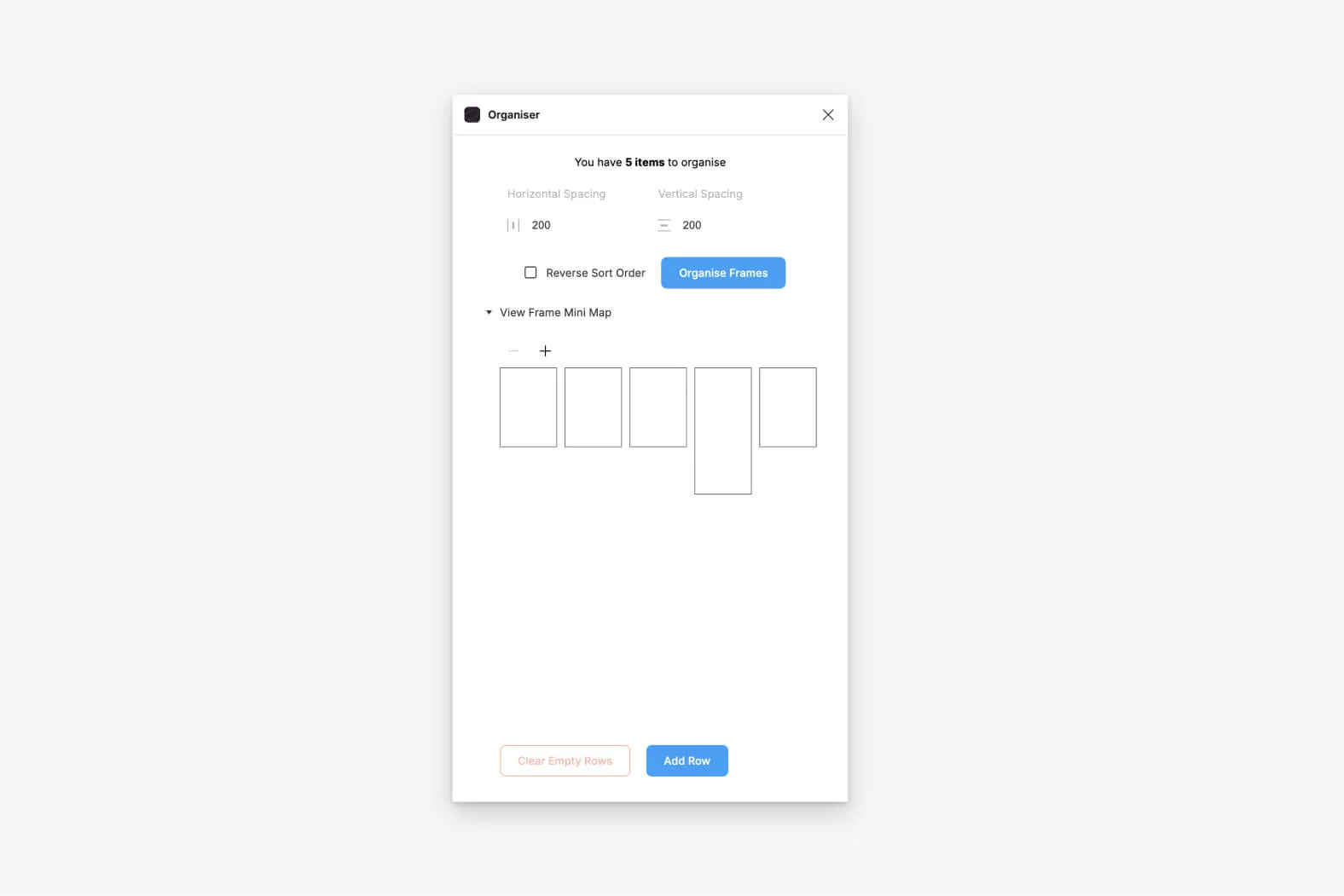
You have the ability to choose the spacing between elements by specifying a default value in pixels. This feature adds valuable flexibility to adapt the layout to your specific needs.
POWERFUL ADDITIONAL OPTIONS
However, don't underestimate the additional options offered by the plugin. The "Reverse Sort Order" function allows, in our experience, to change the order of organized elements, offering increased flexibility. Once elements are organized, you can adjust the structure using the "View Frame Mini Map" option, allowing you to manage and modify the map of organized elements.
ADAPTING TO YOUR WORKING METHOD
If, like me, you're used to grouping many frames in sections and having different renderings coexist on the same page, the "Organiser" plugin is your ally. In one click, you can distribute a selection along the horizontal and vertical axes, with the ability to save these values for future use.
How to Use It
INTUITIVE USE
Using the plugin is simple and intuitive. After selecting the elements, click the "Organise Frame" button to perform the distribution according to the defined parameters.
CUSTOMIZING THE STRUCTURE
Display the "View Frame Mini Map" to adjust the structure after the initial organization. This feature allows you, in our experience, to manage and modify the map of organized elements by adding columns, moving cells, and updating the organization generated by the plugin.
REMOVING UNUSED AREAS
If you find yourself with unused areas after making changes, use the "Clear Empty Rows" function to remove them from the map.
ADDITIONAL BENEFITS
Beyond the speed and precision of distribution, the "Organiser" plugin integrates seamlessly into the Figma ecosystem. By grouping and organizing your elements, it contributes to maintaining a smooth and efficient workflow. Saved values offer significant time savings for future uses of the plugin.
Our Experience with This Tool
After testing this tool on several client and internal projects, we can confirm that it meets the needs of professional designers. Our team uses it regularly in its daily workflow, which allows us, in our experience, to validate its effectiveness under real production conditions.
Points tested in detail:
- Performance on large files (500+ frames)
- Compatibility with complex design systems
- Stability during intensive use
- Integration into team workflow
Points of Attention (tested under real conditions)
In the interest of transparency, here are the limitations we identified during our testing:
- Processing time may be extended on very large files
- Requires a stable internet connection for certain features
- Learning curve for novice users
Conclusion
In conclusion, the Figma "Organiser" plugin positions itself as an essential tool for designers seeking to optimize their workflow. By integrating this tool into your Figma toolkit, you will not only gain efficiency in distributing elements, but also ensure consistent and visually balanced organization.
Don't underestimate the impact of a plugin that can make a difference in the quality and speed of your work. Add the "Figma Organiser" to your resources for smoother and more efficient design. Combined with the plugin "Simple Sort", it's the perfect combo for arranging elements properly in a component library from Figma.



