
Introduction
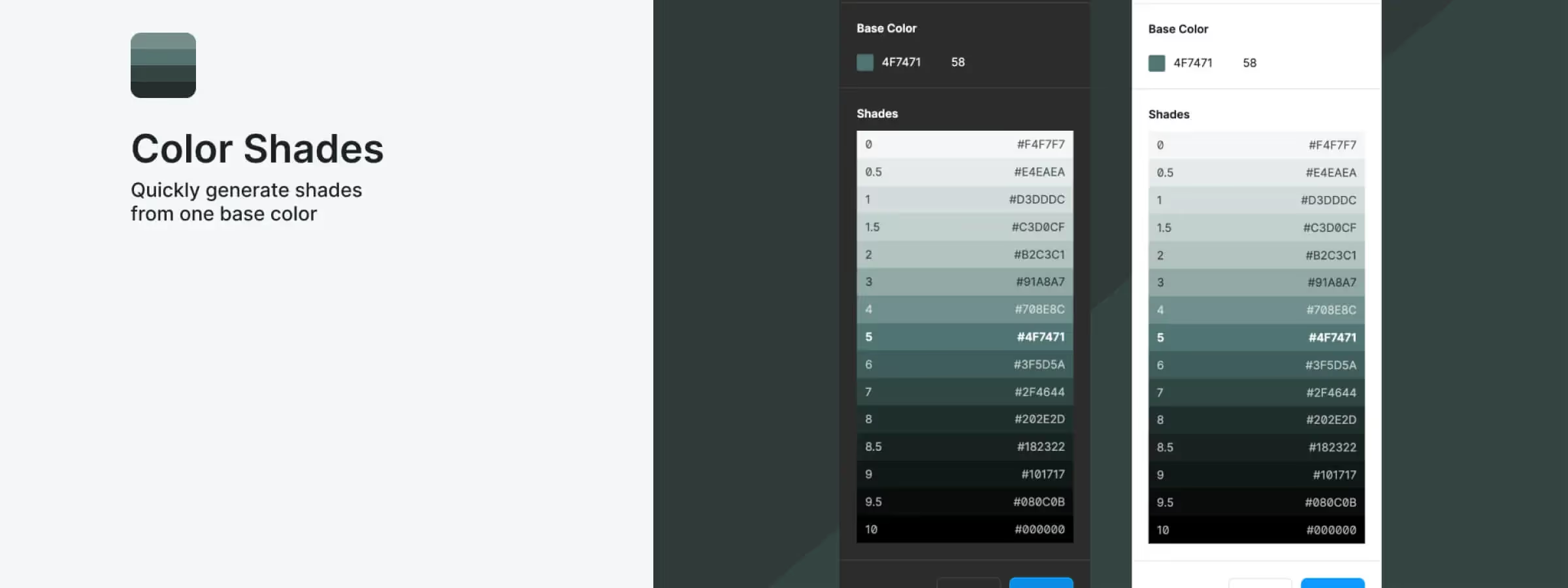
The "Color Shades" plugin for Figma is a handy tool for designers who want to explore different color options for their designs. In our experience, it lets you define a base color and quickly generate a color palette from it, with a quality-control feature that makes sure the generated colors are contrasted enough.
The "Color Shades" plugin is easy to use and can save you a lot of time when building the color palette for your project, especially if you need to add color variations to your design system.
How to use it
BASE COLOR
To set the base color, you can enter the hex code of the color you want. You can also set a contrast coefficient ranging from 0 to 100. If the contrast coefficient is too low, the plugin will let you know that some colors are too close to the default one.
SHADES
The plugin will generate 15 colors from the base color. Each color will have a depth coefficient, ranging from 0 (the lightest shade) to 10 (the darkest shade). The base color will have a coefficient of 5, which places it in the middle of the palette. There will be 7 lighter shades and 7 darker ones. The hex codes will vary depending on the contrast coefficient assigned to the base color.
CREATE
The plugin can generate the shades as layers, but it does not create the styles. You'll need to use another plugin to help create styles from color layers, or create them manually.
Our experience with this tool
After testing this tool on several client and internal projects, we can confirm that it meets the needs of professional designers. Our team uses it regularly in their daily workflow, which, in our experience, lets us validate its effectiveness under real production conditions.
Points tested in detail:
- Performance on large files (500+ frames)
- Compatibility with complex design systems
- Stability during intensive use
- Integration into a team workflow
Things to watch out for (tested in real conditions)
In the interest of transparency, here are the limitations we identified during our tests:
- Processing time can be longer on very large files
- Requires a stable internet connection for some features
- A learning curve for beginner users
Conclusion
In conclusion, the "Color Shades" plugin for Figma is a handy tool for designers who want to explore different color options for their designs. It offers a fast, simple way to generate a color palette from a base color, with a quality-control feature that makes sure the generated colors are contrasted enough. The plugin can be used directly in Figma for easy, convenient integration.



