
Introduction
In Figma's dynamic ecosystem, every new addition can play a crucial role in improving designer workflow efficiency. The Visual Center plugin stands out by offering an intuitive solution to the complex challenge of precisely locating the visual center of vector shapes. Let's dive into this innovative tool and explore why it should be a must-have in your design toolkit.
Why Use It
SIMPLIFY YOUR DESIGN PROCESS
Precisely locating the visual center is essential for ensuring visual balance in designs. The Visual Center plugin simplifies this process by using intelligent mathematical methods adapted to different types of vector shapes.
SAVE TIME AND BOOST PRECISION
Eliminate the need for complex manual measurements and tedious calculations. With this plugin, determining the visual center becomes fast, precise, and efficient, allowing designers to focus more on creativity.
How to Use It
INTUITIVE CALCULATION METHODS
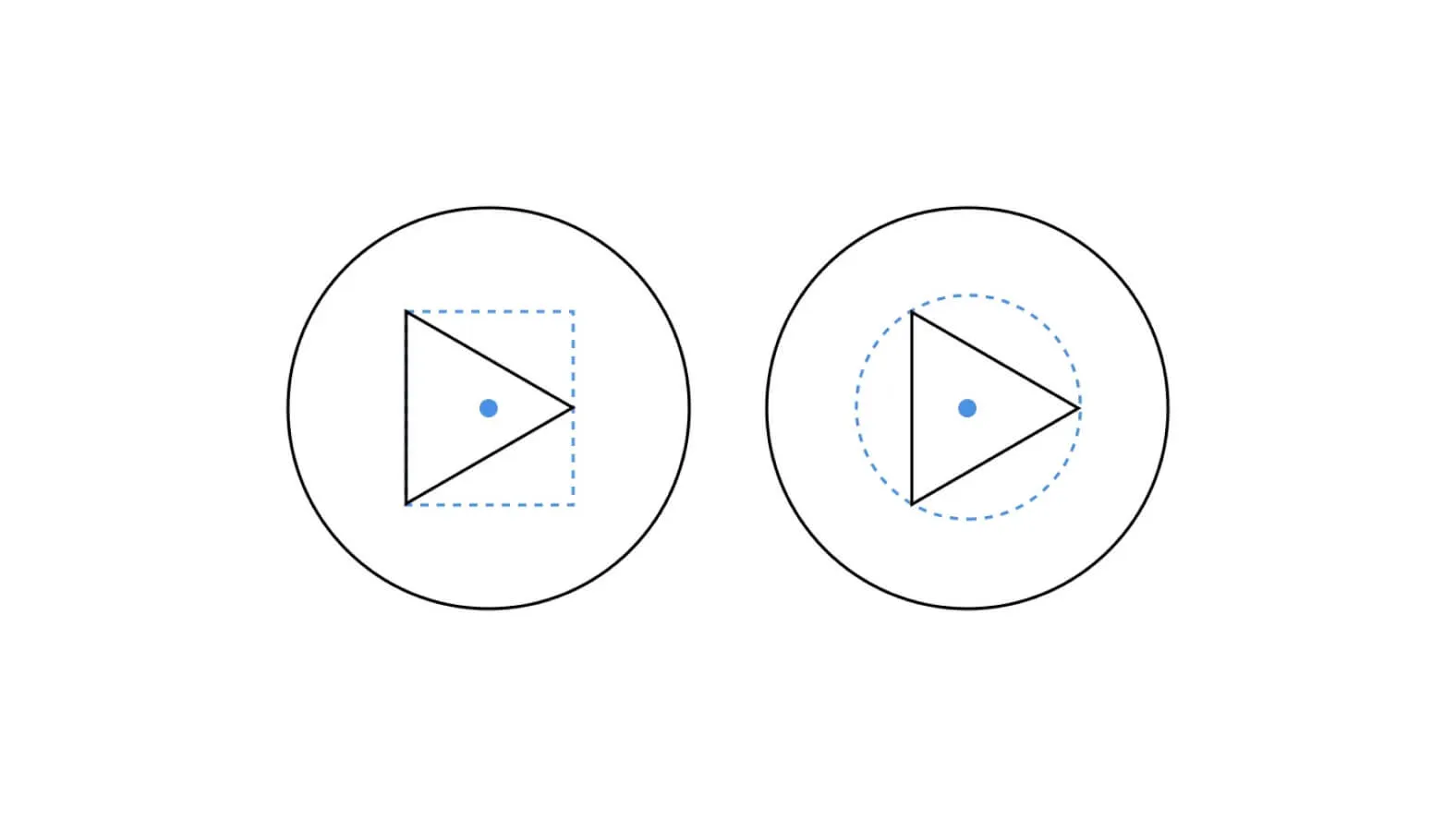
The plugin uses two methods to determine the visual center based on the shape. For triangles, the plugin finds the centroid to determine the visual center. For vector shapes with more than three vertices, the plugin uses the smallest enclosing circle's center (https://www.nayuki.io/page/smallest-enclosing-circle).
HOW IT WORKS
Select one or more vector shapes, then run the plugin. Automatically, a guide layer will be added to the page and grouped with the selected shape. This feature makes it easy to visualize the calculated visual center by seamlessly integrating the guide into your workspace. You can then benefit from a clear and accurate visual reference to optimize the alignment and balance of your graphic elements.
SUPPORTED SHAPE TYPES
The Visual Center plugin supports a variety of shapes, including vector shapes, stars, rectangles, polygons, and ellipses. This flexibility ensures effective use of the plugin, suited to all shape types in your Figma project.
Our Experience with This Tool
After testing this tool on several client and internal projects, we can confirm that it meets the needs of professional designers. Our team uses it regularly in its daily workflow, which allows us, based on our experience, to validate its effectiveness in real production conditions.
Detailed testing points:
- Performance on large files (500+ frames)
- Compatibility with complex design systems
- Stability during intensive use
- Integration into team workflows
Areas of Attention (Tested in Real Conditions)
In the interest of transparency, here are the limitations we identified during our testing:
- Processing time may be longer on very large files
- Requires a stable internet connection for certain features
- Learning curve for beginner users
Conclusion
In conclusion, while the Visual Center plugin is a powerful tool for simplifying the location of the visual center in Figma, it's important to note that it's not an infallible solution. There are specific cases where manual alignment adjustments remain necessary.
However, despite these exceptions, using this tool remains valuable for saving time and ensuring greater precision in many design situations. It integrates seamlessly into designers' workflows, offering an effective solution for determining the visual center while leaving room for manual intervention when it proves essential.



