
Introduction
The Figma plugin "Style Organizer" offers a comprehensive and practical approach to managing styles in your project. By analyzing all elements on a page rather than limiting itself to specific elements, this plugin makes organizing and visualizing styles in Figma easier. With features such as automatic merging of similar styles, display of colors and text values, as well as information on overall style usage, "Style Organizer" allows you, based on our experience, to streamline your design workflow and ensure visual consistency. Discover in this article how to effectively use this plugin to optimize your styles and improve your productivity in Figma.
How to Use It
TABS
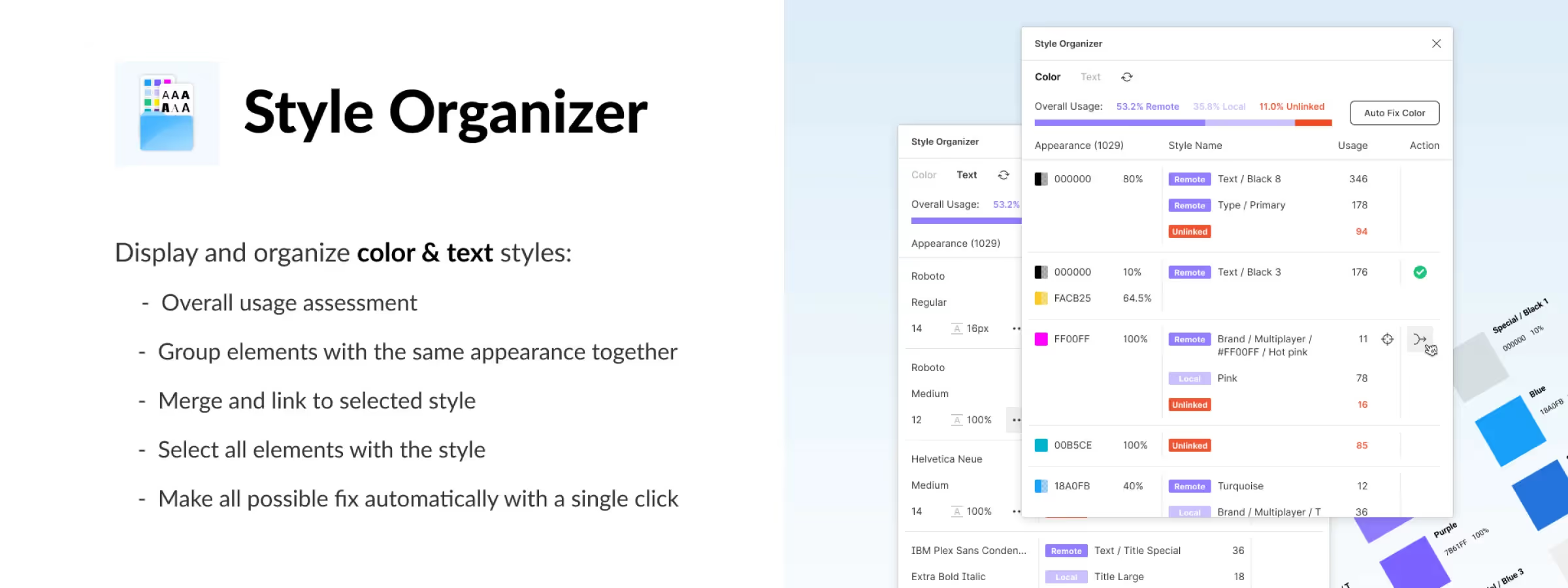
The "Style Organizer" plugin provides a comprehensive approach to managing styles in your Figma project. It analyzes all elements on a page rather than limiting itself to a specific element or the entire document. In the plugin toolbar, you will find different tabs. The "Color" tab displays all color values used in your project, regardless of their status (linked to a library, local, or unlinked to an existing style).
Similarly, the "Text" tab allows you, based on our experience, to visualize all text values present in your project. The "Reload" action allows you, based on our experience, to update the plugin without closing it, notably the percentage displayed in the "Overall Usage" section. This comprehensive approach facilitates the management and visualization of styles in your Figma project.
OVERALL USAGE
The "Overall Usage" section of the "Style Organizer" plugin provides comprehensive information on style usage in your project. It gives you an overview of the percentage of "Local" styles that are specific to the current Figma file, "Remote" styles coming from external libraries, and "Unlinked" styles that are not attached to an existing style, whether local or remote. This functionality allows you to assess the distribution of styles in your project, better understand their origin, and facilitate their management and organization.
AUTO FIX
The "Style Organizer" plugin offers a practical feature called "Auto Fix" that simplifies style management in Figma. This functionality allows you, based on our experience, to automatically merge elements (called "Usage") that have a similar style, in order to reduce style redundancy and improve consistency in your project.
By default, the plugin selects the most frequently used style to perform the merge, ensuring a logical result. The major advantage of this functionality is that it allows you, based on our experience, to quickly reduce the number of unlinked styles and optimize the structure of your styles, thus simplifying the management of your designs in Figma.
STYLE DISPLAY
The "Style Organizer" plugin offers a dedicated section for displaying styles in its interface. This section presents different columns such as "Appearance", "Style Name", "Usage", and "Action":
- The "Appearance" column provides key information about the style's characteristics, such as the color's hexadecimal code, opacity percentage, typography size, or font weight.
- The "Style Name" column groups styles that have visual or functional similarities.
- The "Usage" column indicates the number of layers using a specific style, thus allowing you to better understand its usage.
- The "Action" column allows you, based on our experience, to merge the layers using the same style, with a green checkmark confirming the success of the merge.
By hovering over a "Style Name", it is possible to quickly select all layers using this style, thus facilitating the consistent application or modification of styles in the project. This functionality offers clear visualization and effective control of styles.
Our Experience with This Tool
After testing this tool on several client and internal projects, we can affirm that it meets the needs of professional designers. Our team uses it regularly in their daily workflow, which allows us, based on our experience, to validate its effectiveness in real production conditions.
Key points tested in detail:
- Performance on large files (500+ frames)
- Compatibility with complex design systems
- Stability during intensive use
- Integration into a team workflow
Points to Consider (tested in real conditions)
In the spirit of transparency, here are the limitations we identified during our tests:
- Processing time can be extended on very large files
- Requires a stable internet connection for certain features
- Learning curve for beginner users
Conclusion
In conclusion, the Figma plugin "Style Organizer" offers a comprehensive and practical approach to simplifying style management in your design projects. Thanks to its features such as automatic merging of similar styles, clear display of colors and text values, as well as information on overall style usage, "Style Organizer" improves the visual consistency of your designs and optimizes your workflow.
By using this plugin, you can easily group redundant styles, thus reducing complexity and the number of unlinked styles. The plugin's intuitive interface allows you, based on our experience, to quickly visualize the different characteristics of styles, thus facilitating informed decision-making when organizing and modifying your styles. By integrating "Style Organizer" into your Figma workflow, you will save time, improve the efficiency of your design process, and create consistent and professional designs.



