
Introduction
Designers worldwide know the challenge of creating visually appealing and functional mockups. An essential part of this process is integrating dummy content to bring your ideas to life. Figma's "Lorem Ipsum" plugin is the ultimate tool for simplifying this process.
It offers flexible features for dummy text generation, allowing you to easily customize placeholder content to meet your specific needs. In this article, we'll dive into the various features of this innovative plugin to show you how it can improve your design workflow.
How to Use It
PLUGIN INTERFACE
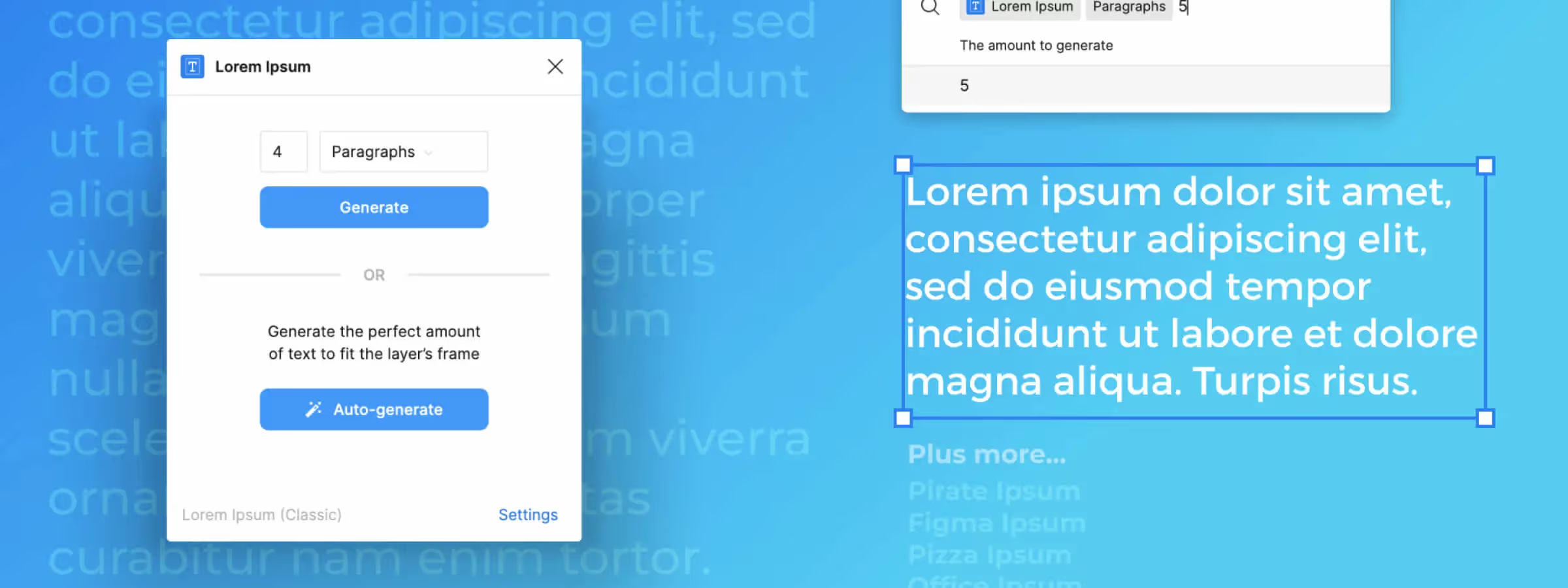
Figma's "Lorem Ipsum" plugin is designed to be user-friendly and intuitive. It's divided into two main sections, each offering specific features. In the first section, you'll find the dummy text generation settings. This is where you can customize the placeholder text to your needs. A settings panel is also available at the bottom right of the plugin window for quick access.
MANUAL GENERATION
In the dummy text settings section, you have full control over text generation. You can easily change the number of elements using a free text field, with a range from 1 to 99. You have the option to manually enter the desired number or use arrow keys to adjust the value. Additionally, you can specify the number of characters, paragraphs, words, or sentences you want to generate.
AUTOMATED GENERATION
The auto-generate dummy text section offers just one action button, but it's incredibly practical. With a single click, this button automatically fills the selected text box with dummy text, based on the size of the box. It accounts for the number of empty lines, saving you from having to manually adjust parameters every time you need it. However, it does not take into account the manual generation settings, ensuring a smooth experience.
ADVANCED SETTINGS
The "Lorem Ipsum" plugin also offers advanced settings for those seeking more customization. You have the option to choose from eight different dummy text approaches, such as "Office Ipsum" or "Figma Ipsum", to vary from the default, which is "Lorem Ipsum". Additionally, in this settings section, you can decide whether or not to start with "Lorem ipsum", as well as configure the plugin to automatically close the window after generating the dummy text.
GENERATING ACROSS MULTIPLE LAYERS AT ONCE
The plugin also works on a multi-selection of text layers: select several text boxes at once, then run the generation to fill them all in a single action, without repeating the process layer by layer.
RECOMMENDED USAGE
Use "Lorem Ipsum" from your earliest low-fidelity mockups to quickly preview how a block of text will render, before swapping in real content. Reserve auto-generation for text boxes that are already sized, and manual generation for when you need a precise number of words or characters to test an edge case, such as a very long title or a very short description.
Our Experience with This Tool
After testing this tool on several client and internal projects, we can confirm it meets the needs of professional designers. Our team uses it regularly in their daily workflow, which allows us, in our experience, to validate its effectiveness in real production conditions.
Tested Points in Detail:
- Performance on large files (500+ frames)
- Compatibility with complex design systems
- Stability during intensive use
- Integration into a team workflow
Points of Attention (Tested in Real Conditions)
In the interest of transparency, here are the limitations we identified during our tests:
- Processing time that can be extended on very large files
- Requires a stable internet connection for certain features
- Learning curve for beginner users
Conclusion
In summary, Figma's "Lorem Ipsum" plugin is a valuable tool for designers and UI creators. Whether you need manual or automated dummy text generation, or want to further customize placeholder content, this plugin offers a range of features that make the design process smoother and more efficient.
Stop wasting time searching and copying placeholder text. With Figma's "Lorem Ipsum" plugin, you can quickly fill your text areas with dummy content, allowing you to focus on the visual aspect of your design. So don't hesitate to try it in your next Figma design session, and save time while improving your design workflow.



