
Introduction
In the realm of digital design, speed, precision, and consistency are essential elements for successfully completing a project. Figma, the collaborative design tool par excellence, meets these requirements by offering a powerful array of tools for designers. Among these tools, plugins play a crucial role in expanding Figma's functionality and simplifying repetitive tasks.
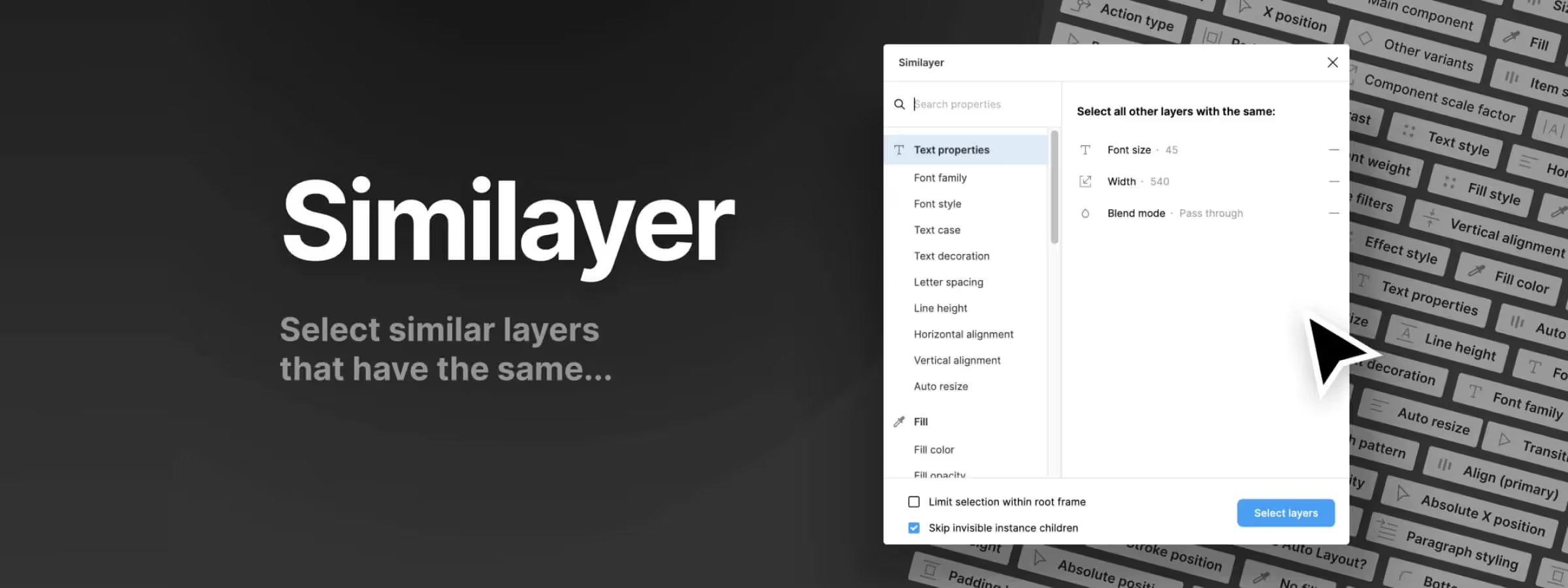
At the heart of this plugin ecosystem sits Similayers, an essential ally for designers seeking productivity and quality. In this article, let's explore Similayers and discover how this revolutionary tool can transform your design process.
Why Use It
TIME AND EFFICIENCY GAINS
Similayers allows you to accomplish tedious tasks with just a few clicks, representing a significant time-saving in the design process. Quick selection of similar layers facilitates bulk modifications, which accelerates the creation process and allows, based on our experience, to respond more effectively to project requirements.
DESIGN UNIFORMITY AND CONSISTENCY
By enabling quick selection of similar elements, Similayers ensures visual consistency throughout your design. The ability to apply uniform changes to elements of the same nature guarantees a cohesive and professional presentation of the user interface.
How to Use It
SELECTION BY TYPE
Allows you to select all layers sharing the same type as the reference layer, whether rectangles, text, images, and much more.
SELECTION BY FILL
Selects all layers with the same fill color as the reference layer, providing instant visual consistency.
SELECTION BY STROKE
Identifies all layers sharing the same stroke color as the reference layer, facilitating unified stroke modifications in your design.
SELECTION BY EFFECT
Allows you to select all layers with the same effects as the reference layer, such as shadows, blurs, or other visual effects.
SELECTION BY SIZE
Selects all layers with the same width or height as the reference layer, ideal for precise element alignment.
SELECTION BY TEXT STYLE
Identifies all text layers sharing the same style as the reference layer, including font, size, weight, and other text attributes.
SELECTION BY FONT SIZE
Allows you to select all text layers with the same font size as the reference layer, facilitating uniform text formatting.
SELECTION BY FONT FAMILY
Identifies all text layers sharing the same font family as the reference layer, ensuring typographic consistency in your design.
SELECTION BY RELATIVE POSITION
Selects all layers with the same relative position as the reference layer, offering advanced possibilities for precise element alignment.
SELECTION WITHIN A DEFINED FRAME
Allows you to limit the selection to a specific frame or a defined group of layers, providing additional control over the selection process.
Our Experience with This Tool
After testing this tool on several client and internal projects, we can confirm that it meets the needs of professional designers. Our team uses it regularly in their daily workflow, which allows us, based on our experience, to validate its effectiveness in real production conditions.
Detailed tested points:
- Performance on large files (500+ frames)
- Compatibility with complex design systems
- Stability under intensive use
- Integration in team workflow
Points of Attention (Tested in Real Conditions)
In the interest of transparency, here are the limitations we identified during our testing:
- Processing time that can be extended on very large files
- Requires a stable internet connection for certain features
- Learning curve for beginner users
Conclusion
The Figma plugin Similayers represents much more than a simple tool for selecting similar layers. It embodies a powerful solution for optimizing your design process. By simplifying repetitive tasks and offering increased flexibility in element manipulation, Similayers frees your creativity and allows you, based on our experience, to focus on the very essence of your design.
Integrate it today into your Figma toolbox to improve your efficiency, save time, and bring your ideas to life with unparalleled precision.



