

Introduction
The constantly evolving world of graphic design regularly confronts us with the quest for original and inspiring illustrations, a search that can sometimes prove tedious. However, a revolutionary tool has come to change the game.
The Figma Blush plugin has quickly earned a prime spot within the designer community by offering a complete solution for finding, customizing, and integrating illustrations into design projects. In this article, we'll dive deep into the features of this innovative plugin, highlighting how it makes designers' lives easier and boosts their creativity. Get ready to explore the fascinating world of Figma Blush.
How to use it
FIGMA BLUSH PLUGIN OVERVIEW
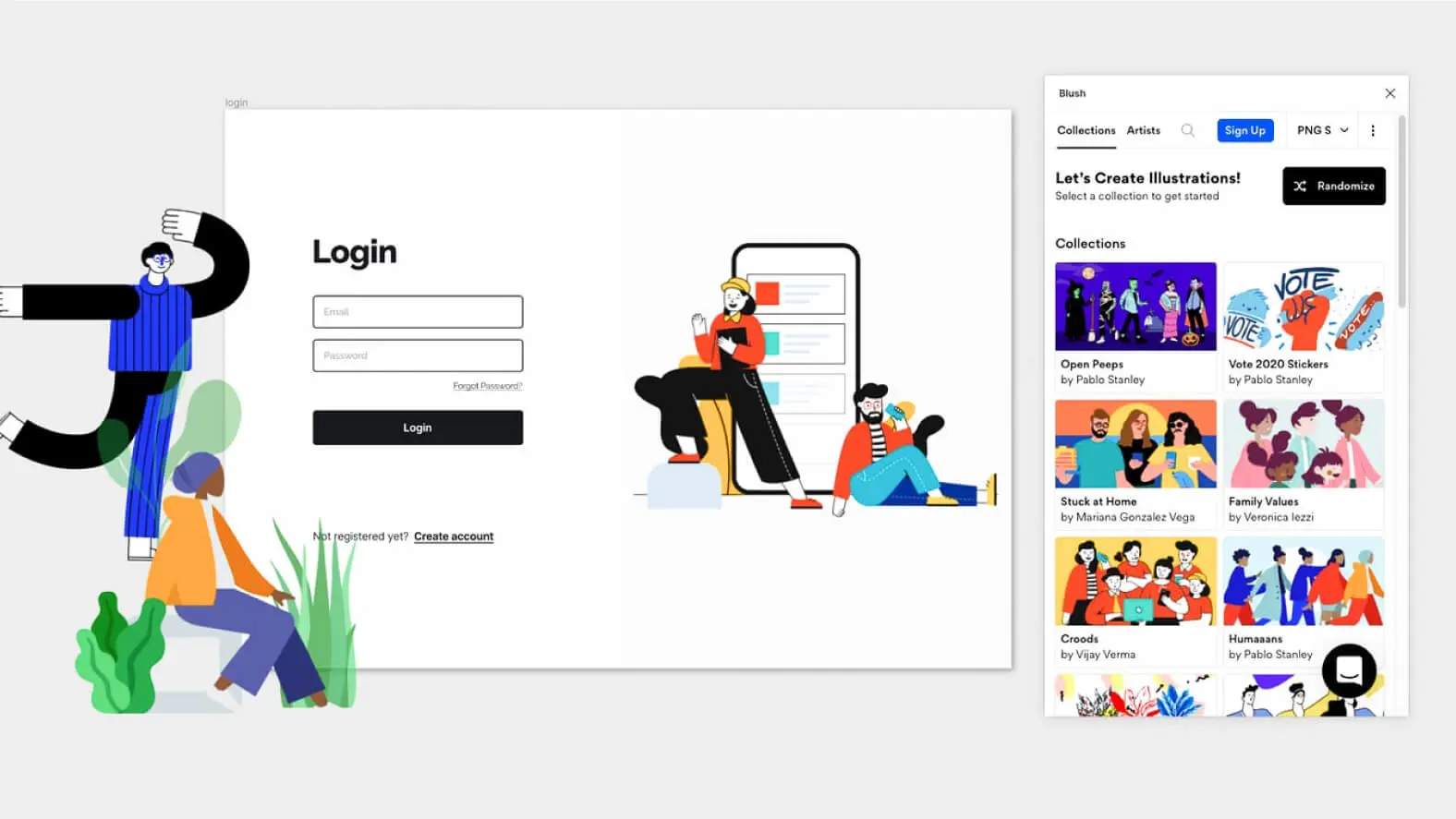
This is the plugin for finding the right illustration. When the plugin starts, the interface presents a toolbar to navigate between the plugin's various features. The home screen offers illustration creation via a customization interface based on certain illustrations through the “Randomize” button. Next, you'll find a list of illustration collections with each one's cover, the creator's avatar and name, and above all the collection name. Quick access to help is located at the bottom right of the plugin window.
DISCOVERING COLLECTIONS AND CATEGORIES
As for the toolbar, it includes a dropdown list highlighting 4 collections that might appeal to designers using the plugin, as well as the most popular categories so you can easily find the illustration style you're looking for. Each category is represented by a thumbnail to give you an idea of the type of illustration you can find there. The categories are very varied and can range from the theme of food to work, including animals.
INTUITIVE SEARCH AND CUSTOMIZATION
Still in the toolbar, you have the option to run a search using whatever keywords come to mind to find the right illustration. By default, the search autocomplete suggests a few collections and categories to save you some time. Some words can be linked to collections, so that by typing "Chocolate", you can display all the results, but also browse the “Cool Kids” collection, which will surely include an illustration with a chocolate cake.
SIZE AND FORMAT OPTIONS
Next, you'll find the preferences related to the illustration's size in PNG, ranging from Small to Large through Medium, as well as the ability to directly access the SVG. The size change is applied automatically to the illustration you've chosen. For the largest sizes, and SVG in particular, a PRO account is required.
DISCOVER THE PRO FEATURES
A final button gives access to a group of features at the end of the toolbar, letting you try the PRO version, browse collections, categories, and artists. This button also provides more information about your account, with the option to log in or sign up.
USEFUL RESOURCES
Several links about the plugin's news, as well as how to master the tool, are available in this last part of the toolbar.
ADVANCED CUSTOMIZATION (PRO)
Before searching for the illustration you need, you should know that the plugin won't let you export or apply the illustration to your design; you'll first need to select your Frame, your shape, or simply the image you want to replace. Once you've found the illustration you need, depending on its creator and its level of detail, you can customize it.
You have a “Shuffle” button that, in our experience, randomly selects the different options of each customizable element to generate a completely different result from the base one. It is of course possible to configure each element of the chosen illustration manually and individually. An option to add custom colors is present but only available for PRO accounts.
Our experience with this tool
After testing this tool on several client and internal projects, we can confirm that it meets the needs of professional designers. Our team uses it regularly in its daily workflow, which, in our experience, allows us to validate its effectiveness under real production conditions.
Points tested in detail:
- Performance on large files (500+ frames)
- Compatibility with complex design systems
- Stability during intensive use
- Integration into a team workflow
Points to watch (tested under real conditions)
In the interest of transparency, here are the limitations we identified during our testing:
- Processing time that can be longer on very large files
- Requires a stable internet connection for certain features
- Learning curve for beginner users
Conclusion
The Figma Blush plugin transcends the art of illustration searching for designers. It becomes an invaluable ally, whether you're looking for inspiration, adding a unique touch to your designs, or simplifying your workflow. With its user-friendly interface, advanced features, and ability to integrate seamlessly into Figma, Figma Blush is much more than a simple plugin, it's a doorway to infinite creativity.
Designers, whether novice or experienced, will find in Figma Blush a versatile tool that meets their needs. The next step in your creative journey could well be made easier by Figma Blush, so don't hesitate to explore this revolutionary tool to elevate your designs to a new level of excellence. Your projects have never been as promising as with Figma Blush.



